

Width tool creating artifacts
Ok. So this has been driving me a little crazy and I haven't found anyone recreate the issue on the forums for some reason. I am working through an illustrator course and one of the video lessons is teaching us about the width tool. Right now I am simply trying to create a path that will match up with some hand lettering. I use the curvature tool and that works fine. I have the path going. The instructor then tells us to bring our stroke width way down as the width tool can create unwanted effects at the end of the path. So I adjust the stroke width down to 0.05 to account for this, but since the path is a circle, this shouldn't matter. Once the stroke has been created, I switch to the width tool and here is the problem I run into.
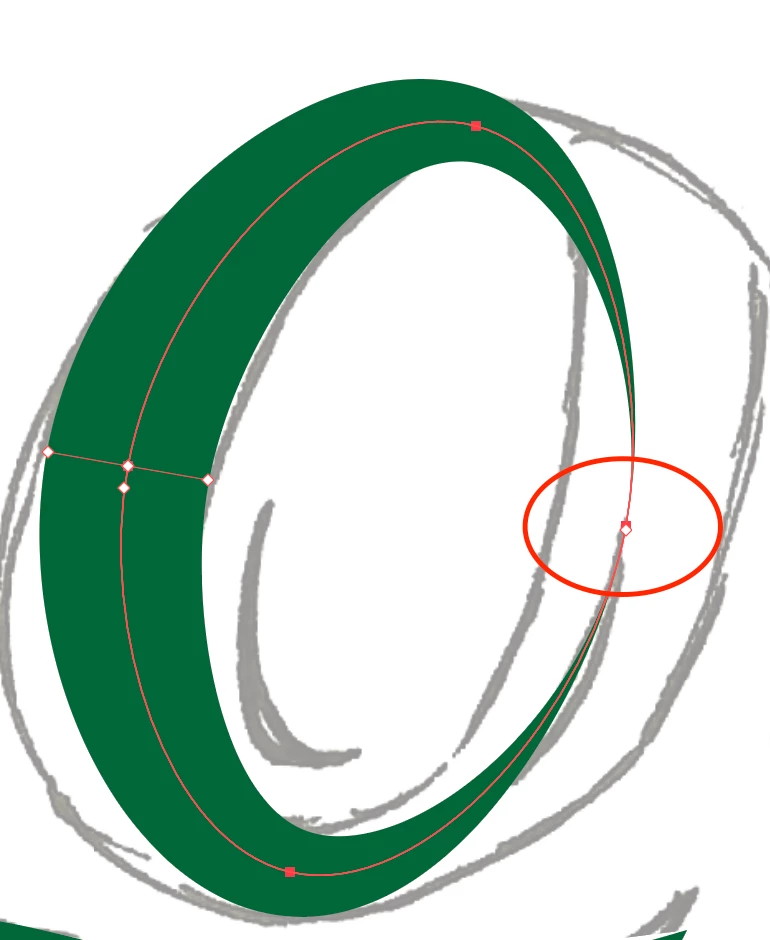
In the middle of that red circle I have drawn, are seemly an infinite amount of width tool points that are not allowing me to create the shape that I desire to make. Here's another screen of what happens when I try to add another width tool point.

The reason this shape is flipped around is that I had to recreate the issue after trying to switch to a uniform stroke. Anyways, I keep running into the same issue anytime I use the width tool. Any insight as to what's happening would be greatly appreciated!
 AdChoices