
Participating Frequently
November 30, 2021
Answered

Will saving as .obj be available in Illustrator?

  • November 30, 2021
  • 2 replies
  • 939 views

Hi everyone. 


As Photoshop announced that they will gradually discontinue 3D after the 22.5 update, I want to know if it will be made available to us to save 3D objects from Illustrator with the same ending, that is .obj or even .stl


I am not willing to pay extra $39 a month to use Substance 3D just to create simple shapes to add into Dimension. If maybe someone knows of another way to create custom 3D shapes to add into Dimension that wouldn't cost extra, would be greatly appreciated. Or maybe if there is a way to save it already from Illustrator to use directly in Dimension that I'm missing...?


Thank you very much for your time.


This topic has been closed for replies.
Correct answer Doug A Roberts

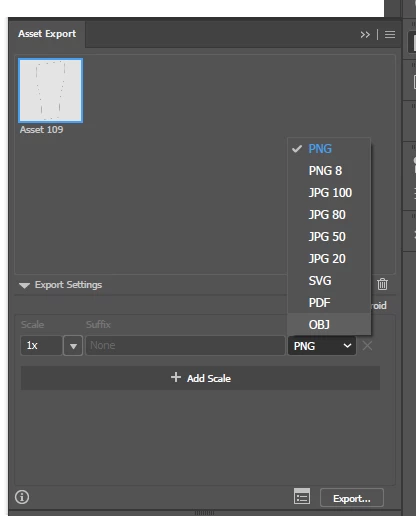
If you apply the new 3D settings to an object, you can export it as OBJ via the asset export panel:

2 replies

Doug A Roberts
Community Expert
Doug A RobertsCommunity ExpertCorrect answer
Community Expert
November 30, 2021

If you apply the new 3D settings to an object, you can export it as OBJ via the asset export panel:

Participating Frequently
November 30, 2021

Amazing! Problem solved.

Thank you so much for your time.

Legend
November 30, 2021

I have no inside knowledge, so I'm free to speculate. This seems vanishingly unlikely. It seems to me that 3D was removed from Photoshop to encourage people to migrate to Substance 3D. So, the last thing that would serve that plan is to put 3D features into Illustrator. (Planning conference... "What's the business justification for OBJ export in Illustrator?", "It saves people from needing to subscribe to Substance 3D", "So our the aim of this feature is to reduce revenue to Adobe?", [long silence])

Participating Frequently
November 30, 2021

Yes, that was my suspicion as well, which I was less than happy about. It would not have been a smart move to eliminate it completely - But it seems like there is an option from Illustrator that I'm very happy with. 🥰