Participant
February 4, 2019
Answered

3D text to a single vanishing point in Illustrator

  • February 4, 2019
  • 1 reply
  • 1111 views

Hi There,

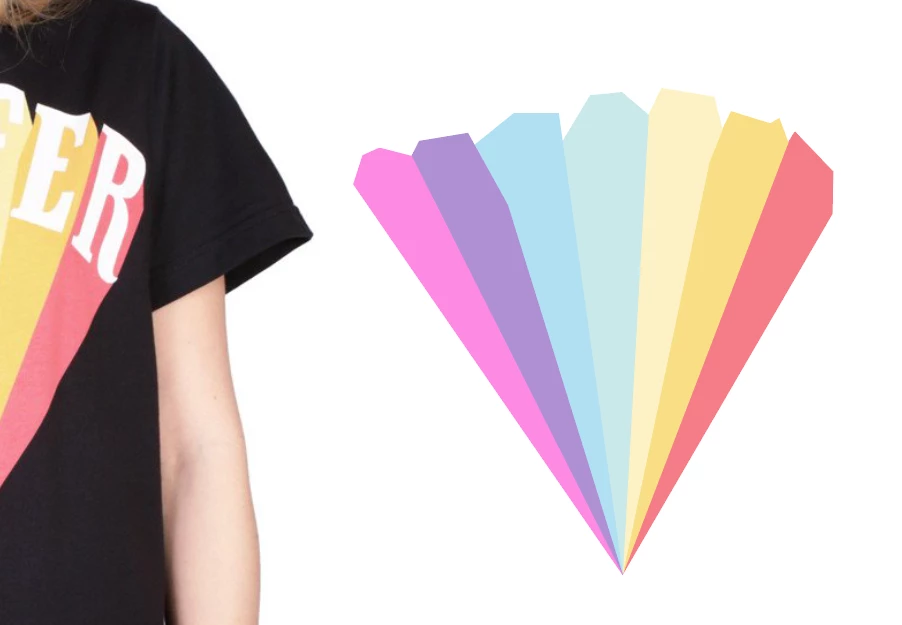
I'm trying to figure out how to create 3d text to a vanishing point in AI. I have attached a photo of exactly what I'm trying to create.

I want to have the different colours in each section as well. Help is much appreciated as it's driving me crazy trying to figure it out!

Thanks so much!

    This topic has been closed for replies.
    Correct answer Doug A Roberts

    Your example isn't 3D text to a vanishing point, it's a set of coloured shapes that converge on a certain point. You would just draw them behind the letters and assign a fill to each. All you need to do is make sure the top edges don't overlap the top of the letters.

    1 reply

    Doug A Roberts
    Community Expert
    Doug A RobertsCommunity ExpertCorrect answer
    Community Expert
    February 4, 2019

    Your example isn't 3D text to a vanishing point, it's a set of coloured shapes that converge on a certain point. You would just draw them behind the letters and assign a fill to each. All you need to do is make sure the top edges don't overlap the top of the letters.