
Exit
  • Global community
    • Language:
      • Deutsch
      • English
      • Español
      • Français
      • Português
  • 日本語コミュニティ
  • 한국 커뮤니티
2

'A file I/O error has occured' when tryint to save as a pdf to sharepoint

New Here ,
Nov 29, 2019 Nov 29, 2019

A colleague is opening an Illistrator file from sharepoint then trying to save it as a pdf to the same folder on sharepoint but is getting the below error.
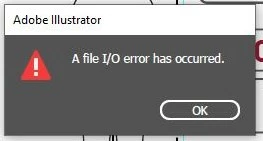
AI error message.jpg

However when they go to save the file again it does save, why are we gettingthe error in the first place?


TOPICS
Performance , Sync and storage
12.2K
Translate
Report
Community guidelines
Be kind and respectful, give credit to the original source of content, and search for duplicates before posting. Learn more
community guidelines
Adobe
Community Expert ,
Nov 29, 2019 Nov 29, 2019

Hi,

Can you confirm the version of the software and the operating ssytem you are using?

Also please describe the steps you took and what you are trying to achieve.

Is that SharePoint local or Online? 

Is your colleague exporting to a URL or a synced folder?

An I/O error is a communication issue, it is possible that the first attempt is used to reconnect to the URL (library) and then, once the connection is re-established, the upload works well. 

I use synced libraries (on Windows only) without issues.

Translate
Report
Community guidelines
Be kind and respectful, give credit to the original source of content, and search for duplicates before posting. Learn more
community guidelines
New Here ,
Nov 29, 2019 Nov 29, 2019
LATEST

Can you confirm the version of the software and the operating ssytem you are using?

Version 24.0.1 Windows 10

Also please describe the steps you took and what you are trying to achieve.

They were opening an ai file making changes to it saving the ai file then saving as pdf selecting the folder click save then the error pops up,

Is that SharePoint local or Online? 

We are using SharePoint Online

Is your colleague exporting to a URL or a synced folder?

Synced folder

An I/O error is a communication issue, it is possible that the first attempt is used to reconnect to the URL (library) and then, once the connection is re-established, the upload works well. 

I use synced libraries (on Windows only) without issues.

Translate
Report
Community guidelines
Be kind and respectful, give credit to the original source of content, and search for duplicates before posting. Learn more
community guidelines
Advisor ,
Nov 29, 2019 Nov 29, 2019
Translate
Report
Community guidelines
Be kind and respectful, give credit to the original source of content, and search for duplicates before posting. Learn more
community guidelines