Known Participant
July 27, 2017
Answered

Adding motion blur to one side of a shape?

  • July 27, 2017
  • 3 replies
  • 6900 views

I have a rectangle that I want to add some motion blur to on the right side of it only. How can this be done?

Thanks in advance for any help.

    This topic has been closed for replies.
    Correct answer Danny Whitehead.

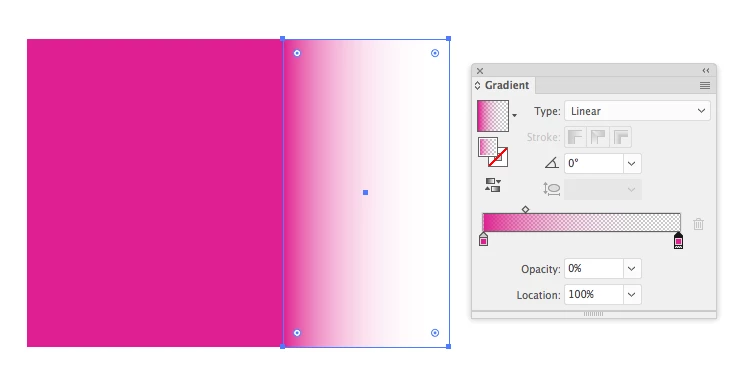
    I'd use a simple gradient from 100-0% opacity of the rectangle's colour, rather than a mesh.
    3 replies

    Jacob Bugge
    Community Expert
    Community Expert
    July 27, 2017

    Stan,

    As I (mis)understand the purpose and desired appearance, you may blend your way through (you may go back and forth in the steps):

    1) Create a copy behind the shape and give it a suitable transparency (maybe 50%);

    2) Create a copy behind the copy and Move it to the right, to the end of the desired motion blur, and set the Transparency to 0;

    3) Set a suitable number of Specified Steps for the Blend;

    4) Select both the reduced transparency shapes and Make the Blend.

    This should work for any (other) shape (also) and for shapes with/without strokes.

    Danny Whitehead.
    Danny Whitehead.Correct answer
    Legend
    July 27, 2017

    I'd use a simple gradient from 100-0% opacity of the rectangle's colour, rather than a mesh.

    barbara_a7746676
    Community Expert
    Community Expert
    July 27, 2017

    Much easier to do in Photoshop.

    In Illustrator, I would duplicate the rectangle.

    Make a gradient mesh out of one of the rectangles.

    Put the mesh behind the solid rectangle.