
Inspiring
July 14, 2017
Answered

Adjusting path after adding "type on a path"

  • July 14, 2017
  • 2 replies
  • 1156 views

After I create a path and add "type on a path" to it, can I grab the anchor points or handles and adjust the shape of the path?

In my experiments, I can't do this. If I try to select a single anchor point and drag it, the whole path and its text comes along.
    This topic has been closed for replies.
    Correct answer michelew83603738

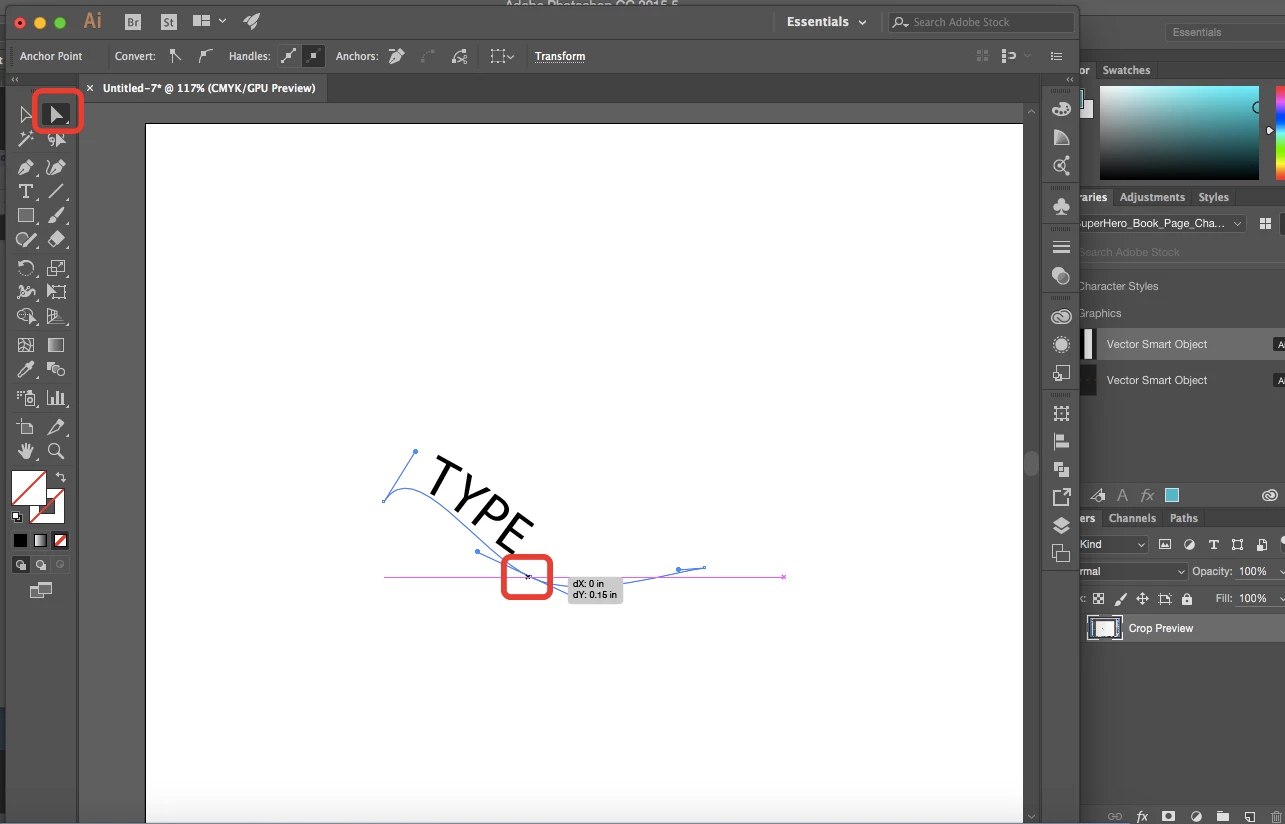
    Make sure you are in the direct select tool. Click on the path and you should be able to adjust the path that you drew and adjust individual anchor points as you can see below.

    2 replies

    Ton Frederiks
    Community Expert
    Community Expert
    July 14, 2017

    try to first deselect the path and then direct select an anchor point.

    Inspiring
    July 15, 2017

    that's what I'm doing. The whole path moves.

    Bill Silbert
    Community Expert
    Community Expert
    July 15, 2017

    Are you clicking right on the anchor point and dragging directly from that anchor point?

    Bill Silbert
    Community Expert
    Community Expert
    July 14, 2017

    Make sure that you are selecting the single anchor point using the Direct-Selection Tool (the white arrow at the top of the tool panel). Pulling on that single selected point will move it anywhere you want it to go. If you want to move more than one point at a time hold the shift when selecting additional points.

    Inspiring
    July 15, 2017

    That's what I'm doing. The whole path moves.