Participant
January 23, 2021
Answered

adobe illustrator automatic renaming my save files

  • January 23, 2021
  • 3 replies
  • 2270 views

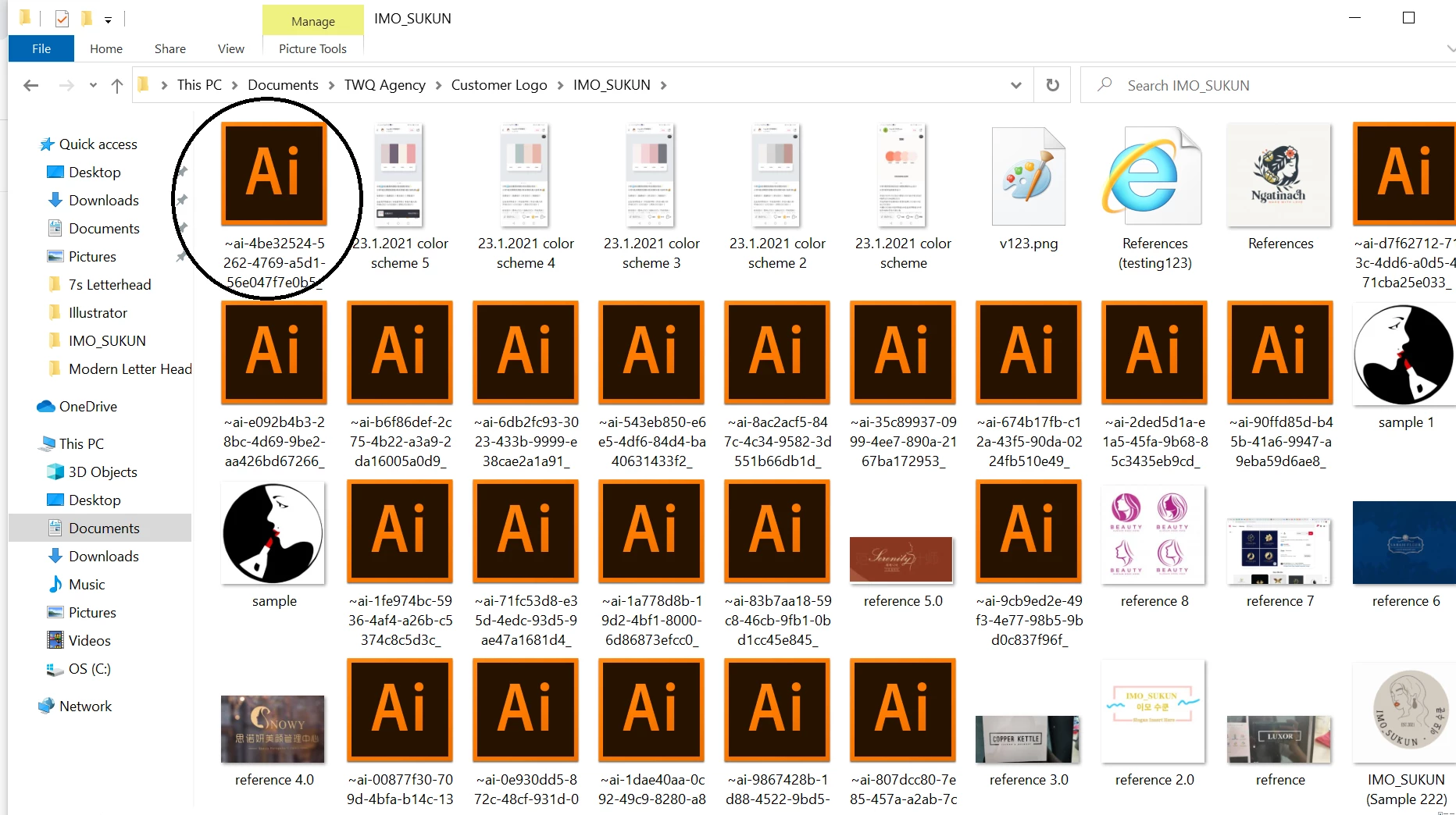
I have a probelm with my Adobe Illustrator, after I save my worl as a ai file. 

I went to find my saved file in my computer folder it will help me rename to something else. 

Please help me address this issue 
 

This topic has been closed for replies.
Correct answer Ashutosh_Mishra

Hi Aaron,


Sorry to hear about this. This is not the usual behavior of the app. I agree with @lambiloon & @Monika Gause  both here. I see multiple files with similar pattern here. You're saving files on the local drive.

I'd recommend you to do these two things mentioned below:

1. Reset preferences: https://helpx.adobe.com/illustrator/using/setting-preferences.html#setting_illustrator_preferences

**Please note that resetting preferences will remove all the custom settings and Illustrator will launch with default settings. You can also take a backup of the folders in case you want to. Location is mentioned in the article.


2. Try creating a new user account on your machine: https://support.microsoft.com/en-us/windows/create-a-local-user-or-administrator-account-in-windows-10-20de74e0-ac7f-3502-a866-32915af2a34d


Let us know if it helps.


Regards,

Ashutosh

3 replies

Ashutosh_Mishra
Ashutosh_MishraCorrect answer
Inspiring
January 23, 2021

Hi Aaron,


Sorry to hear about this. This is not the usual behavior of the app. I agree with @lambiloon & @Monika Gause  both here. I see multiple files with similar pattern here. You're saving files on the local drive.

I'd recommend you to do these two things mentioned below:

1. Reset preferences: https://helpx.adobe.com/illustrator/using/setting-preferences.html#setting_illustrator_preferences

**Please note that resetting preferences will remove all the custom settings and Illustrator will launch with default settings. You can also take a backup of the folders in case you want to. Location is mentioned in the article.


2. Try creating a new user account on your machine: https://support.microsoft.com/en-us/windows/create-a-local-user-or-administrator-account-in-windows-10-20de74e0-ac7f-3502-a866-32915af2a34d


Let us know if it helps.


Regards,

Ashutosh

Monika Gause
Community Expert
Community Expert
January 23, 2021

This is not necessarily a virus.


This might be caused by:

- malconfigured user pivileges

- saving tosynchronized folders

- saving to networks

- the option "Save in background" turned on in Illustrator

- harddisk issues

Aaron5E71Author
Participant
January 23, 2021

Thankyou so much for the reply! how can I address this issue?

Monika Gause
Community Expert
Community Expert
January 23, 2021

First I would turn off "Save in background" in the Illustrator preferences. Then try if it helped.

Save only in unsynchronized local folders. Does it help?

Check the user privileges. Does it help?

lambiloon
Community Expert
Community Expert
January 23, 2021

Hi this is may be some virus in your computer try to do clean install of everything ..... regards

Ali Sajjad / Graphic Design Trainer / Freelancer / Adobe Certified Professional
Aaron5E71Author
Participant
January 23, 2021

hi! thank so much for replying me. 

is there any ways to detect the virus and maybe clean it?