
BobT366
Inspiring
October 18, 2018
Answered

Adobe Illustrator CC 2019 Type Library Reference Broken / Missing

  • October 18, 2018
  • 4 replies
  • 9155 views

Upon upgrading to Illustrator 2019 and attempting to update my reference in my Visual Studio project, I receive an error that it cannot reference the COM Component.

VB.Net or C# projects attempt to add the reference from: C:\Program Files\Adobe\Adobe Illustrator CC 2019\Plug-ins\Extensions\Scripting Support.aip

Visual Studio 2010 gives the error:
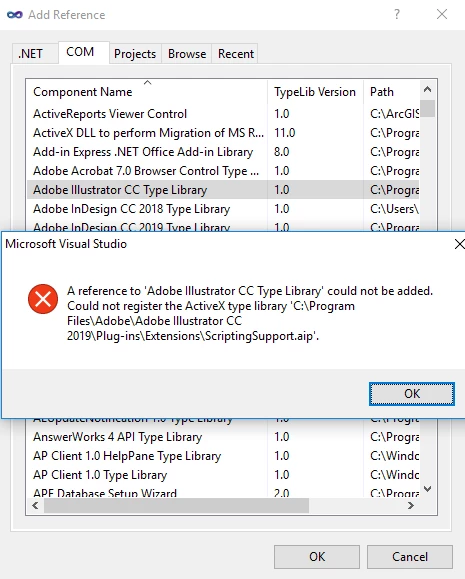
Attempting to Manually Browse to the file is impossible as VS2010 only recognises the file types:

Visual Studio 2015/2017 has the same issue, but does allows me to Manually Browse and select "All Types". However this still fails with the same error.

VB6 and InDesign work fine. However I'm struggling with .Net & Illustrator. We automate Adobe Illustrator so need this working. 2018 was fine, we simply selected the reference and away we went.

Alternatively since there's only the .aip file available, shouldn't there be a type library somewhere? I presume something in the Registry is pointing VS to the plugins folder for the reference, which it obviously doesn't want for this kind of thing.

This topic has been closed for replies.
Correct answer BobT366

The version with this fix is now Live. Thanks all!

4 replies

BobT366
BobT366Author
Inspiring
December 13, 2018

Status on the UserVoice page has now switched to "Planned".

BobT366
BobT366Author
Inspiring
January 29, 2019

Fix Adobe Illustrator CC 2019 Type Library Reference - VB scripts return error – Adobe Illustrator Feedback

All. Now fixed. Apparently it's working in beta (see link above), and will be deployed in a release soon.

BobT366
BobT366AuthorCorrect answer
Inspiring
February 12, 2019

The version with this fix is now Live. Thanks all!

Participant
November 14, 2018

New version (23.0.1) of Illustrator didn't fix this issue. Anybody found a work around?

Participant
November 14, 2018

Yes, uninstalling the latest Illustrator and installing an older version :-(

BobT366
BobT366Author
Inspiring
November 14, 2018

Same. Is there any more formal way to report this to Adobe? Seems they don't monitor here...

Participant
October 19, 2018

Getting exact same error.

Further:

Tried late binding with c# dynamic to get around issu with importing into Visual Studio. Does not work.

dynamic ai=Activator.CreateInstance(Type.GetTypeFromProgID("Illustrator.Application"));

// Illustrator starts

var doc = ai.Open(System.IO.Path.GetFullPath(AIfilename));

// Error - TYPE_E_LIBNOTREGISTERED

BobT366
BobT366Author
Inspiring
October 19, 2018

Looks like they've definitely ballsed it up on their end then.

Do they monitor this section?

BobT366
BobT366Author
Inspiring
October 18, 2018

Further details:

I've just reinstalled Adobe CC 2018, although the available COM reference still looks at ScriptingSupport.aip, upon adding it, "Interop.Illustrator.dll" is added to, and referenced by my project.

This doesn't seem to be happening with 2019, no matter what Visual Studio version I use.

Participating Frequently
October 18, 2018

Getting exact same error.

Further:

when searching through the registry for "CC 2019" I discovered some entries having pathnames in which a backslash is missing between CC 2019 and Support Files\Contents\Windows.

Received following error message when executing our software:

"Exception occurred in exportObjects (A5):System.Runtime.InteropServices.COMException (0x80040154):

Retrieving the COM class factory for component with CLSID {0DC1BAC6-5A43-480A-84C3-301582B1EB02} failed

due to the following error: 80040154 Class not registered (Exception from HRESULT: 0x80040154 (REGDB_E_CLASSNOTREG))."

CLSID {0DC1BAC6-5A43-480A-84C3-301582B1EB02} has not been defined inside the Windows registry.