
Participating Frequently
February 19, 2017
Answered

[Adobe Illustrator] Creating transparency out of scan

  • February 19, 2017
  • 1 reply
  • 498 views

Hey guys,

I have issue crating transparent area on one of my scans.
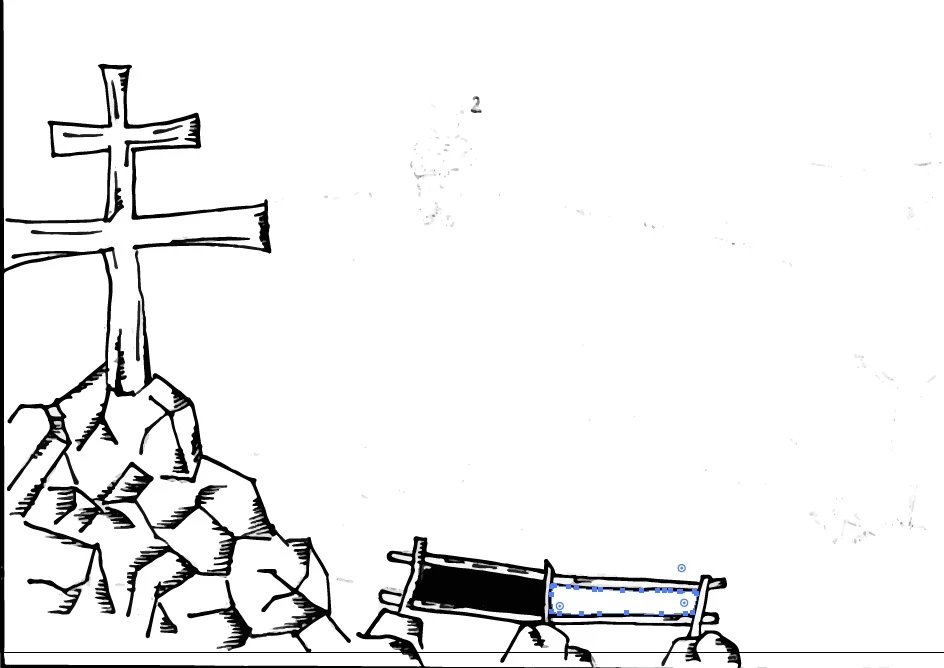
The thing is, I want to delete inner parts of the fence. I got only one layer, image is vectorized, and the rest works fine, except of fence. I already deleted left part, so you can see what is going on. Afterwards illustrator will select is as whole object, making it unable to delete inside of fence.
Any ideas ?

I also tried to edit this in photoshop, created transparent png, but after vectorizing, illustrator creates black area again.

    This topic has been closed for replies.
    Correct answer Rob de Winter

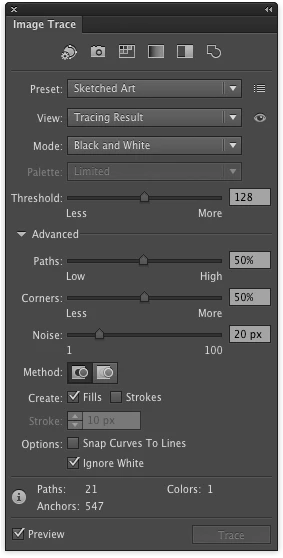
    Hey, I'd try this: trace the original image again, and edit the Image Trace options afterwards. When you edit the "advanced options" you can check "ignore white". All white parts will be transparent then (screenshot below).

    In this case I think it's possible to create the transparent part afterwards with Pathfinder (or the Shape Builder Tool --> holding ALT/Option when drawing on the part you want to make transparent; make sure you've selected everything). Hope this'll help you!

    1 reply

    Rob de WinterCommunity ExpertCorrect answer
    Community Expert
    February 19, 2017

    Hey, I'd try this: trace the original image again, and edit the Image Trace options afterwards. When you edit the "advanced options" you can check "ignore white". All white parts will be transparent then (screenshot below).

    In this case I think it's possible to create the transparent part afterwards with Pathfinder (or the Shape Builder Tool --> holding ALT/Option when drawing on the part you want to make transparent; make sure you've selected everything). Hope this'll help you!

    Filip5Author
    Participating Frequently
    February 19, 2017

    This worked as expected. Thank you!

    Community Expert
    February 19, 2017

    Great! Good to hear that enjoy making beautiful illustrations!