
Participating Frequently
December 13, 2018
Question

AI 2019: Pen tool acting strangely when drawing curves

  • December 13, 2018
  • 1 reply
  • 3034 views

I am working with Illustrator 2019 and i've noticed some strange behavior with the pen tool lately. I'm tracing over an outline of a land mass with lots of curves moving in and out. When i click and drag the pen to create a smooth curve, and then move on to draw the next point, the handles appear to be pointing in the opposite direction:
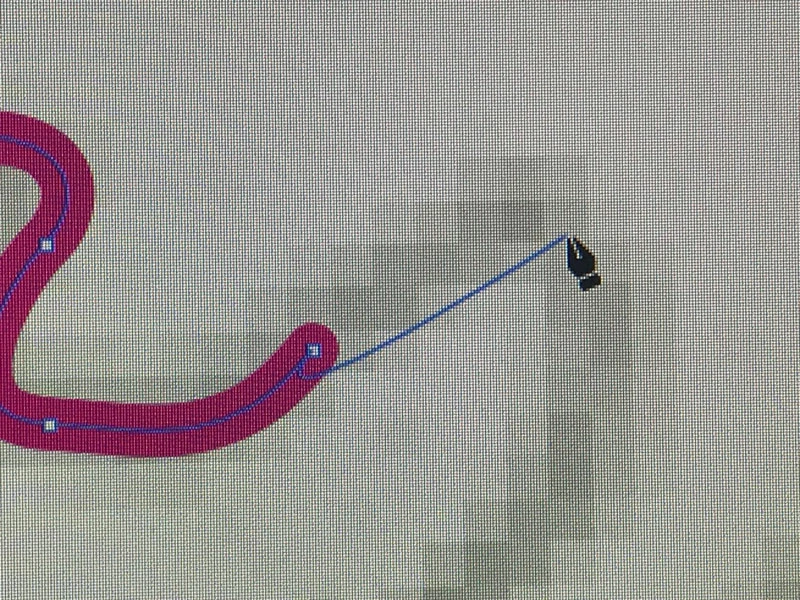
Then, i move on and draw the next point, and the handles correct themselves, but then the next point does the same thing:
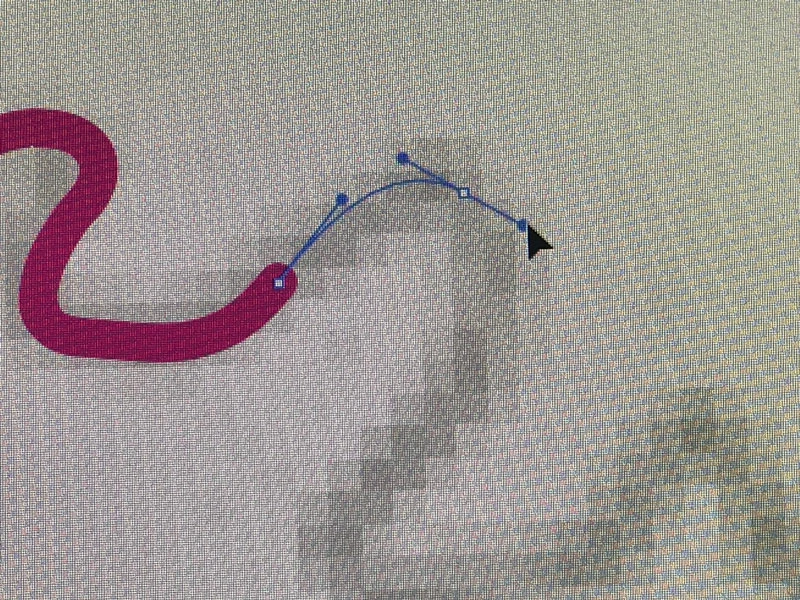
Anyone else experiencing this?

This topic has been closed for replies.

1 reply

barbara_a7746676
Community Expert
Community Expert
December 13, 2018

I am not experiencing this. Try closing and reopening the file. Then try resetting preferences. How to set preferences in Illustrator

If that doesn't work, you may need to uninstall/reinstall.

Participating Frequently
December 13, 2018

Thanks Barbara,

Looks like i figured it out. I reversed the path direction in the Attributes Panel and that fixed it

barbara_a7746676
Community Expert
Community Expert
December 13, 2018

Thanks for letting me know your solution. However, I don't see any settings in the Attributes panel that would have affected that.