Heenaaah
Known Participant
June 10, 2021
Answered

Airbrush in Illustrator!

  • June 10, 2021
  • 3 replies
  • 7668 views

First, I don't understand why is there is no airbrush in illustrator, it can transition the vector to a really 3d graphic!


Second, how can I make an airbrush brush in illustrator or find somewhere online?

This topic has been closed for replies.
Correct answer Ton Frederiks

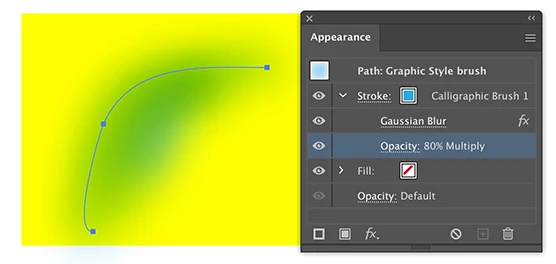
As was already mentioned, it is possible to simulate an airbrushy brush. The end result will be pixels, because it uses pixel effects like Blur. But it is possible to change the size, positon, opacity, color, resolution  and more afterwards, which makes it flexible (and slow). Here is an example:
 

3 replies

Ton Frederiks
Community Expert
Ton FrederiksCommunity ExpertCorrect answer
Community Expert
June 12, 2021

As was already mentioned, it is possible to simulate an airbrushy brush. The end result will be pixels, because it uses pixel effects like Blur. But it is possible to change the size, positon, opacity, color, resolution  and more afterwards, which makes it flexible (and slow). Here is an example:


Heenaaah
HeenaaahAuthor
Known Participant
July 15, 2021

Thanks a ton, Ton! 🙂

Ton Frederiks
Community Expert
Community Expert
July 15, 2021

🙂

Kurt Gold
Community Expert
Community Expert
June 11, 2021

In Illustrator you can create custom bristle brushes which heavily consist of transparent objects (as a reference you can check the default bristle brush library that is located in the Window menu).


You can also create all kind of other custom brushes and combine them with transparency and all sorts of raster effects in order to get some airbrush look-and-feel.


But be careful or keep at least in mind that the more you use them the slower Illustrator will perform.


Heenaaah
HeenaaahAuthor
Known Participant
June 11, 2021

Thanks Kurt! Is there a tutorial or way to achieve it? I know how to make a custom brush. But unaware of the transparency and raster effects thing. I will look into it too.


And thanks for the  heads up 🙂

Kurt Gold
Community Expert
Community Expert
June 10, 2021

Can you post some examples that may explain what you are looking for?


Also, which version of Illustrator are you using?


Heenaaah
HeenaaahAuthor
Known Participant
June 11, 2021

these are the brushes in photoshop which I need and couldn't find on illustrator. I am using the 2017 version!

c.pfaffenbichler
Community Expert
Community Expert
June 12, 2021

I don't understand the reason behind it though, with all the latest advancements in tech and features over the year why can't a soft brush be provided by the illustrator. I hope something comes up soon! 


I have shared an image of a circle above the blue and purple effect is the airbrush effect I did on photoshop


I don't understand the reason behind it though, with all the latest advancements in tech and features over the year why can't a soft brush be provided by the illustrator. I hope something comes up soon! 

Potentially millions of distinct path elements compared to one Layer with pixels will probably make a performance-related difference for a while yet. 


I have shared an image of a circle above the blue and purple effect is the airbrush effect I did on photoshop

That does not seem to be a particularly meaningful example of what you want to achieve ultimately – what kind of illustrative style do you have in mind?