Participant
December 14, 2019
Answered

Align stroke to outside of text in Illustrator

  • December 14, 2019
  • 1 reply
  • 2448 views

i hope adobe illustrator can do as simple as what corel draw did in case "align stroke to outside of editable text"


{Renamed by MOD}

This topic has been closed for replies.
Correct answer Ton Frederiks

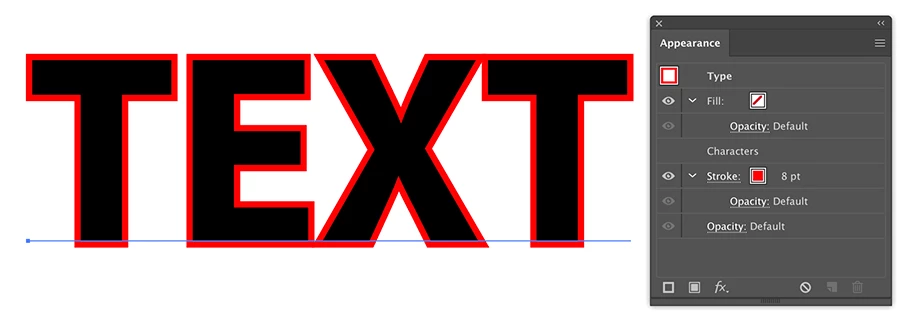
It can be easily done in a similar way.

Just add a stroke in the Appearance Panel and drag it below the Characters.
1 reply

Srishti Bali
Community Manager
Community Manager
December 14, 2019

Hi there,


Thanks for reaching out. Please take a look at this similar discussion: https://graphicdesign.stackexchange.com/questions/16910/how-to-add-multiple-strokes-aligned-outside-to-a-type-layer-in-illustrator-cs6 and let us know if this helps. If not, please share a few screenshots of what you are trying to create.


Regards,

Srishti

Participant
December 14, 2019

for example in coreldraw, just one click i have so many menu e.g i can increase width of stroke and the stroke is behind the main text. and all is so simple (even new in coreldraw) and text still editable

sorry about my engilsh, because is not my native

Ton Frederiks
Community Expert
Ton FrederiksCommunity ExpertCorrect answer
Community Expert
December 14, 2019

It can be easily done in a similar way.

Just add a stroke in the Appearance Panel and drag it below the Characters.