
Align text to arrow head (or to start and end anker of a line)
Hi there,
I'm stuck with an alignment issue when creating a chemical reaction scheme or illustration. Is there a way to align text to the tip and start anker of a line/arrow? Each arrow in the scheme, an example is attached, has a chemical formular written next to its start and to its end point. I would like to aling the x of the text with either of the two ankers at the end/start point of the arrow (circled) How can I align existing text to those anker points (without moving the arrow) and additinally define the distance between the text and the arrow to be larger than default (and the same for all arrow-text combinations in the illustration).
I tried to use the aling tool to aling to a anker point, but this did not work. I can align arrows tipps to boxes, but not to text. Is there a way to do this?
I tired to use the aling to object, but then the text alway appears inside the box surrounding the arrow, which looks odd.
Any help apprechiated,
best, Thorsten
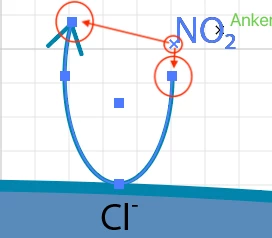
[ attachment inserted as inline image by moderator ]
 AdChoices