
Known Participant
April 26, 2020
Question

Can not run script - Random Swatches Fill

  • April 26, 2020
  • 5 replies
  • 9284 views

Hi

http://vectorboom.com/load/freebies/freescripts/randomswatchesfill/22-1-0-167 

This script is popular and tested by many users, but not work on my computer


- Selected multiple object

- Selected multiple colors

- File - Script - Random Swatches Fill
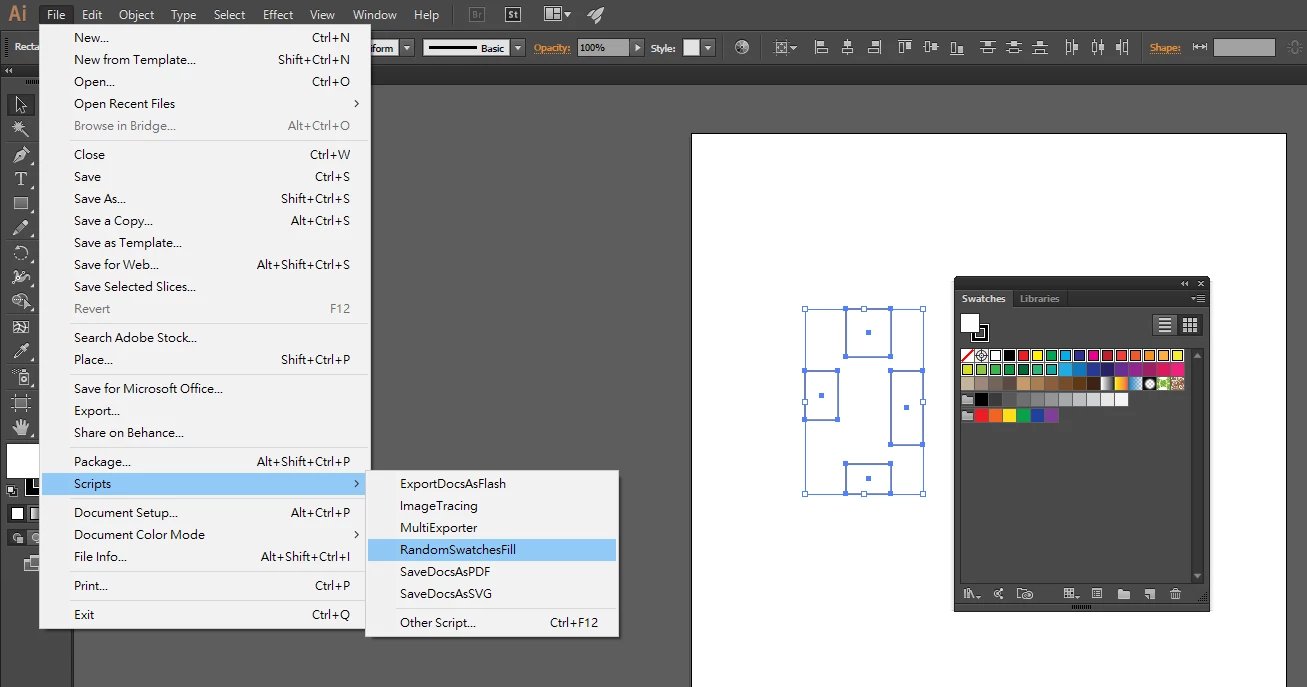
Not a single pop up and nothing change, I having both CC2015 and CC2019, and I tried both, all failed.


Anyone can help to see how to fix ?


Thanks

5 replies

Participant
August 23, 2021

I thought it did not work too but the reason was I did not select the swatches. Before activating the script you need to select ungrouped objects and the swatches in swatches panel that you intend to use.

Ton Frederiks
Community Expert
Community Expert
April 26, 2020

.js works fine on a Mac too.

I suspect grouped objects.

CarlosCanto
Community Expert
Community Expert
April 26, 2020

great, thanks for posting your solution. Are you on mac? On Windows it worked with the script saved as js.

Charu Rajput
Community Expert
Community Expert
April 26, 2020

By seeing the screen shot attached by @wkcalvin, it seems it is Windows 🙂

Best regards
CarlosCanto
Community Expert
Community Expert
April 26, 2020

hmm...it works fine here, tested both CC2019 and CC2020 on Windows 10.


your rectangles aren't grouped right? other than that I don't see a reason for failing.

wkcalvinAuthor
Known Participant
April 26, 2020

I get it


rename js extention to jsx, it works


Thanks a lot

ramab70059665
Participant
November 12, 2021

THANK YOU For the Genius help!

CarlosCanto
Community Expert
Community Expert
April 26, 2020

we're unable to download your attached image. Can you repost it using the Inline image upload button? it's called "insert photos"

wkcalvinAuthor
Known Participant
April 26, 2020

OK, thanks


Uploaded, see if can help


Thanks