


- Home
- Illustrator
- Discussions
- Can't find "dimensions" info/control in Illustrat...
- Can't find "dimensions" info/control in Illustrat...

Copy link to clipboard
Copied
In previous versions of Illustrator, there was a small window on the upper "toolbar" that displayed the dimensions of the selected item on the artboard. You could also use the H and V dropdowns to adjust dimensions manually, or you could type in the boxes to change the selected item's size, both proportionally or not, depending on whether the little "chain" link was clicked.
Here's a screenshot from Illustrator CS4 of the feature I'm talking about:

I've searched far and wide in Illustrator CC to find a way to toggle this panel on. Does anyone know where it is? It's NOT the Info palette, as that just gives you the dimensions of the selected item without any interactive controls.
TIA for pointing out what isn't obvious, at least to me...


 1 Correct answer


is that panel there at all? if not, Window > Control
if it is there but with no transform controls, have a look at the panel's drop down menu:
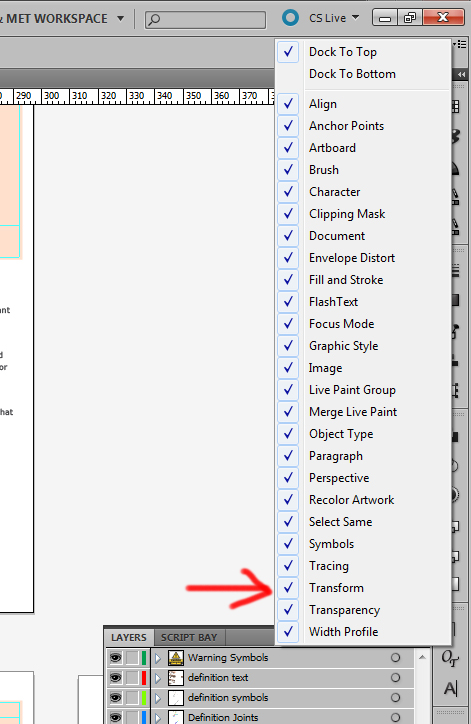
i'm relying on not a lot having changed since CS5. if none of this helps, I can't be much more help 


Explore related tutorials & articles
 16
Replies
16
16
Replies
16

Copy link to clipboard
Copied
is that panel there at all? if not, Window > Control
if it is there but with no transform controls, have a look at the panel's drop down menu:

i'm relying on not a lot having changed since CS5. if none of this helps, I can't be much more help 
Copy link to clipboard
Copied
Thanks - it was there, all right. But I guess in CC the word "Transform" on the top bar is now a clickable link, which leans to the controls I'm looking for. If there's a way to make it appear expanded all the time, I dunno where that thing might be. After all, Opacity (also a clickable link here) shows the most commonly used control, the Opacity percentage, but somehow the Transform controls are now hidden in a panel that only appears when you click on the word "Transform".

Not so convenient, and, in the traduition of Adobe interface control "tinkering", probably customizable somewhere or other. This issue is discussed here: http://forums.adobe.com/message/5160738, but without and definitive answer, I think. BUT, that discussion gave me a hint, which proved to be the answer!
The "default" configuration of the top bar's included features, as selected from it's dropdown at the far top right, includes "everything" - some 25 different tools. If you deselect "enough" of them, voilá ! Back comes the display of whatever the interface "thinks" it has room to show! I just deselected tools until the Transform controls returned from the Land of Interface Invisibility. This is especially dumb, as there is plenty of apparent physical space on the bar to display the Transform controls. Of course, if you're running an enormous monitor at very high resolution, all of this stuff just goes away...
Thanks again for your suggestions!
Copy link to clipboard
Copied
yeah i thought the range of stuff it decides to display there expanded was just dependent on screen real estate. if you haven't changed monitors between version i'd guess it's just some interface tweaking they've done.
Copy link to clipboard
Copied
Funny, I am running CC on my new machine, which I have not yet switched over to my "primary" pair of monitors - a 20" for main display and a 19" for palettes and such.
The new machine is temporarily just connected to another single 19" monitor, and can only run at 1280 x 1024 maximum, whereas my primary monitor runs at 1600 x 1200. I'll bet that once I switch over to the larger monitor, the toolbar in Illy will look like it "used to".

Copy link to clipboard
Copied
If you want it as it was before you have to uncheck "Shapes" in the panel menu 

Copy link to clipboard
Copied
Thank you!

Copy link to clipboard
Copied
Did you ever figure out how to get the "toolbar" to display the dimensions of the selected item on the artboard? I cannot!!! Can you help?

Copy link to clipboard
Copied
Copy link to clipboard
Copied
I have the newest Illustrator and that is not an option for me. Unless that is something I am missing!
Copy link to clipboard
Copied
It's not an option to configure the control panel?
Then you will have to buy a larger monitor.
Copy link to clipboard
Copied
Not that! I don't have a CS Live menu and my Windows > Control, does not have the drop down menu option. I have the biggest monitor from Apple Desktop.
Copy link to clipboard
Copied
Please show us what you have and what you don't like about it.
Copy link to clipboard
Copied

There is no drop down menu under "Control"
Copy link to clipboard
Copied
Look to the right.


Copy link to clipboard
Copied
Here you go!
Under the Window tab.


Copy link to clipboard
Copied
If you disable Object Type in Dock Menu works fine, because you got a monitor space to option show up.


Find more inspiration, events, and resources on the new Adobe Community
Explore Now
 AdChoices