
Participant
November 2, 2018
Question

cannot save illustrator files due to lack of embedded fonts

  • November 2, 2018
  • 2 replies
  • 516 views

I installed one license of my Adobe Creative Suite (v5.1) on my new Lenovo X1 Carbon laptop with Windows 10, and cannot save Illustrator files after Placing PDF files. I get the following message:
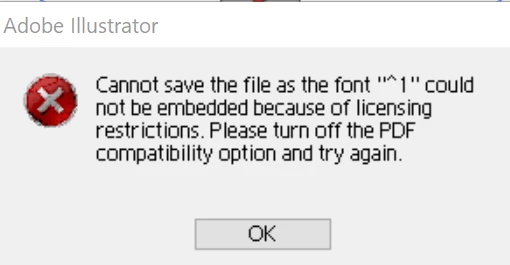
I've never seen this error on any of my other systems with older version of Windows (but the same version of Illustrator)  when I perform the same process. That error points to a font that I don't believe exists...

Thanks!

[Moved from generic Cloud/Setup forum to the specific Program forum... Mod]

[Here is the list of all Adobe forums... https://forums.adobe.com/welcome]

This topic has been closed for replies.

2 replies

Monika Gause
Community Expert
Community Expert
November 2, 2018

Use a different font.

It's the font that causes this.

John T Smith
Community Expert
Community Expert
November 2, 2018

Two ideas that MAY work to install and/or run old programs in Windows 10

-RIGHT click the program icon or EXE and select a compatibility mode in the pop up option window

-or Run as Administrator http://forums.adobe.com/thread/969395 to assign FULL Windows permissions may help... this says Encore, but is sometimes required for ALL Adobe programs (this is NOT the same as using an Administrator account) so follow the instructions, substituting the name and location of your specific program for Encore

-also https://helpx.adobe.com/x-productkb/global/create-local-administrator-account-windows.html