Inspiring
September 13, 2011
Answered

Change page orientation? CS5.1

  • September 13, 2011
  • 2 replies
  • 48573 views

Because having page orientation under Document Setup made too much sense, Adobe, apparently, moved it. I have a page in Landscape. I want to change it to Portrait.

Does anyone know how to do this basic thing?

Thank you!
    This topic has been closed for replies.
    Correct answer _scott__

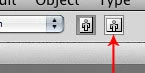
    Switch to the Artboard Tool (Shift-O) then hit the "other" orientation button on the Control bar.

    2 replies

    Participant
    February 25, 2016

    thank you for the SHIFT O.... geez it took forever to find someone who had this answer with an existing document SO THANK YOU (i am new to the program so it was frustrating)

    Larry G. Schneider
    Community Expert
    Community Expert
    September 13, 2011

    Document Setup>Edit Artboards (upper right) and then drag the edges to the new desired configuration. Probably easier would be to make a new document in a protrait configuration and copy/paste the elements to the new file.

    _scott__
    _scott__Correct answer
    Legend
    September 13, 2011

    Switch to the Artboard Tool (Shift-O) then hit the "other" orientation button on the Control bar.

    tallscotAuthor
    Inspiring
    September 13, 2011

    OK, got it. Thank you so much.