

Answered
Colors get messed up on export to .SVG
Hello,
I am a novice user of Illustrator 2021 and I've run into a problem with exporting a background I've designed following this tutorial : https://www.youtube.com/watch?v=SoW7ue0p3mc
When exporting to .PNG the colors match those of my working file. Yet when exporting to. SVG and opening it in any browser, the colors are all washed out.
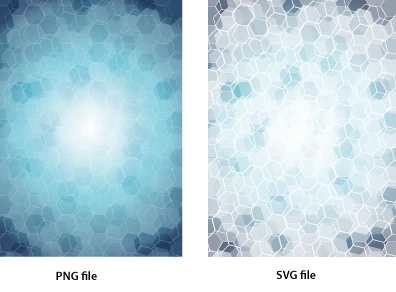
I've been browsing the support community and the web for an answer to my problem, and tried :
- checking if the document color mode was in RGB, which it was
- checking if the document color profile was sRGB, whch it was
- checking if the color of the different objects weren't in greyscale, which they were not
- saturating color of SVG file after export (see below), but the blues are different ; they look like the color mode is in CMYK

In short, I didn't have any luck with the solutions found so far so any help would be greatly appreciated !
Cheers,
 AdChoices