
Colors locked in a pink tint?
For seemingly no reason at all, my white shapes I was creating turned pink. When selecting their color from the color picker I am trying to select between White and Black and the colors are locking in at pinkish shades instead. Text comes out perfectly fine in black and white but my shapes I'm creating with the paint brush are not. It was a brush I created myself which also started in black with hue shift selected. Everything was working fine for a bit, the brush came out white like I needed it to and then I minimized to do something else online and when I returned to my project that was when I noticed the colors seemed weird. I thought it was my eyes but it isn't. It isn't a monitor calibration thing, I have tried recoloring the artwork, closing the program and starting it up again, trying to make it grayscale (then it becomes blueish gray), but I am completely at a loss. I have even tried hitting undo as far as I can to see if it was something I accidentally did but it just begins removing the pieces that were previously placed before this tint came into play. Please, please tell me there is a solution for this. I have really important projects to complete as soon as possible.
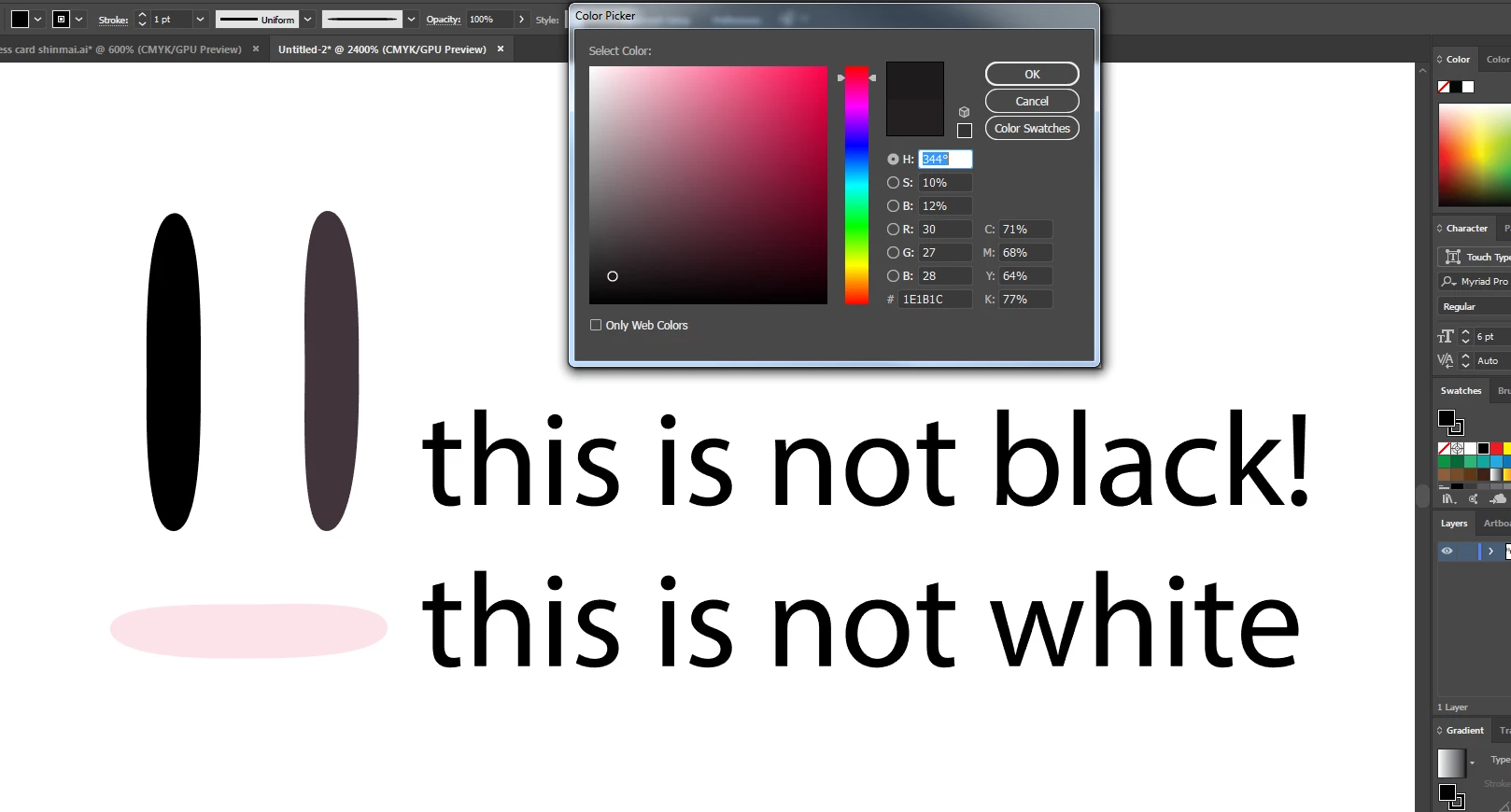
Here is a screenshot to show the colors. The color picker is showing what it defaults on whenever I try to make it select a full black.
 AdChoices