
Participant
February 19, 2020
Question

Colour Profile change when Exporting JPG from Ai 2020.

  • February 19, 2020
  • 2 replies
  • 2639 views

Hi,


I have two saved JPGs from the same Ai file, one (right side) is saved after update of software (2019-2020), as in I deleted and reinstalled.


Is this why this is happening? Or am I missing something 🙂 
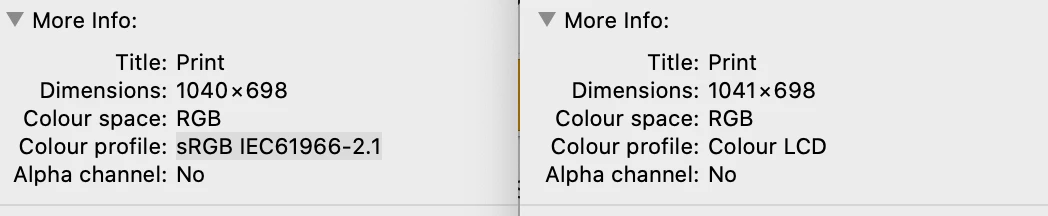
 

The HUE set in the document is still the same, but once saved the colour profile is changing to LCD, which is showing a change in the colour of the art work. Help 😞 Thank You In Advance 🙂 

This topic has been closed for replies.

2 replies

Ton Frederiks
Community Expert
Community Expert
February 19, 2020

I see in your color setting that your Color Management Policies are set to Preserve Embedded Profiles for RGB.

I guess that you Opened the jpeg in Illustrator. That means it will keep the RGB profile and not be converted to your sRGB working space.

You can change this for future imports by setting the Color Management Policies for RGB to Convert to Working Space.

Participant
February 19, 2020

I think I've done it, I've gone into 'Assign Profile' within Ai. This was all created/exported from Illustrator from the same file. So fingers crossed its worked, thank you so much for your advice, I will go have a look at this too. 🙂

Participant
February 19, 2020

Legend
February 19, 2020

Please show your Adobe Illustrator colour settings in the problem version of Illustrator.

And please show the JPEG export dialog with settings filled in.

The hope is to find something simple rather than a bug that will be difficult to resolve.

Participant
February 19, 2020