
Inspiring
September 17, 2019
Question

Combining Art Brushes and Width Tool

  • September 17, 2019
  • 4 replies
  • 1072 views

Hello


I was hoping to quickly create a pattern to be used as texture for a snake.

I created the pattern and turned it into an Art Brush. Then I applied the Art Brush to a line; works perfectly.

Then I hoped to just use the Width Tool in order to adjust the pattern to go smaller or wider in certain areas; total fail.

You can see what I mean in the image below.
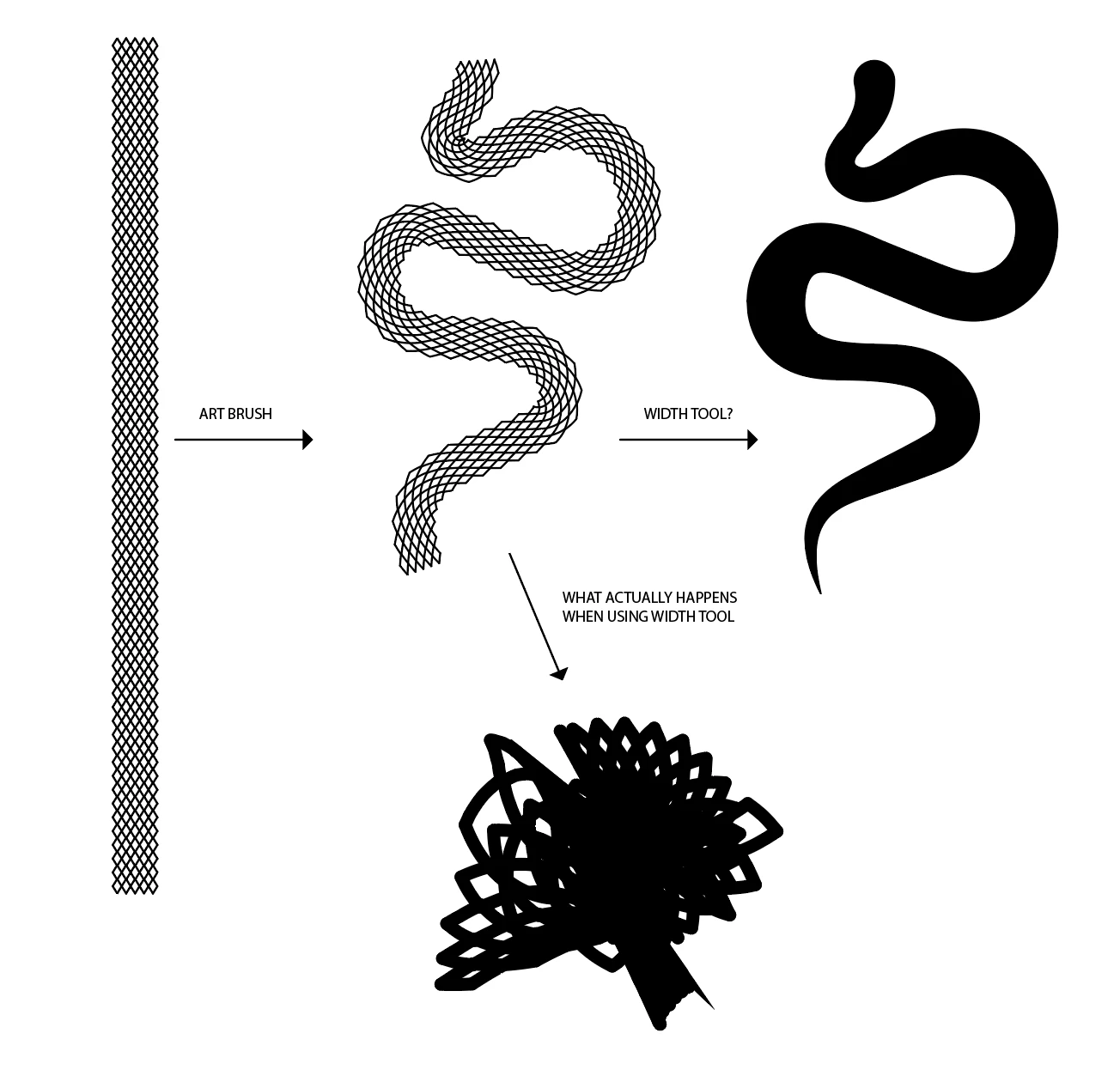
Any ideas on how to solve this?


Thanks a bunch!

    This topic has been closed for replies.

    4 replies

    saberbeAuthor
    Inspiring
    September 22, 2019

    Thanks all for the great tips, I'm suprised by how quick the qualitative input arrived.


    For future reference; I did get the best result using these steps;


    1. create the variable width stroke (width tool) first with a solid stroke
    2. save the variable width as a variable width profile (bottom of stroke panel)
    3. create a long art brush (rather than a pattern brush; the pattern brush is easier to manipulate, but leaves unwanted gaps)
    4. apply the art brush to the stroke
    5. apply the previously saved variable width profile


    The result is a mathematically looking pattern width a consistent stroke width (because strokes werent expanded)


    Doug A Roberts
    Community Expert
    Community Expert
    September 23, 2019
    If you're seeing unwanted gaps in a pattern brush, you probably don't have a no stroke/fill path included to define the pattern boundaries.
    Doug A Roberts
    Community Expert
    Community Expert
    September 17, 2019

    Hi, I got some rather confusing results from an art brush with the width tool, but nothing quite like yours. However, I had a good result with a pattern brush (on the left), so perhaps you could try that:


    The width controls work fine for other art brushes though. I'm not sure what goes wrong with this particular one.

    Doug A Roberts
    Community Expert
    Community Expert
    September 17, 2019
    Aha, I see what the issue is after seeing Monika's post.
    saberbeAuthor
    Inspiring
    September 17, 2019

    I do get somewhere expanding the brush and the using the Warp Tool to shift it in place. But then I use the mathematical feel it has now because lines get jagged a bit.

    Monika Gause
    Community Expert
    Community Expert
    September 17, 2019
    It makes totally sense to have live strokes in brushes. But it breaks when you do exactly this (applying variable width)
    saberbeAuthor
    Inspiring
    September 17, 2019
    So I just tested with expand strokes -although I would want the same stroke width- and it is less bad. But I have to drag the stroke width to about 1000% of what it actually is when released.
    Monika Gause
    Community Expert
    Community Expert
    September 17, 2019

    Did you outline the strokes before creating the brush?

    saberbeAuthor
    Inspiring
    September 17, 2019
    No because I dont want to vary the line width