Participant
January 31, 2018
Answered

Create an Art Brush with rounded Corners (Stroke Panel)?

  • January 31, 2018
  • 4 replies
  • 3649 views

Hello there!

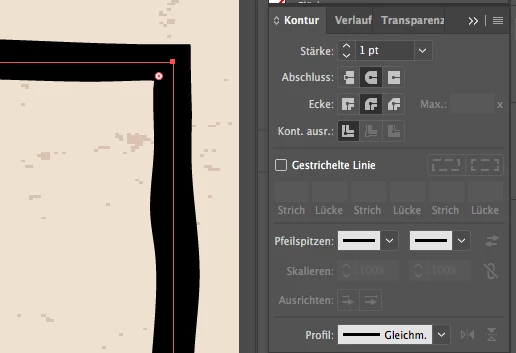
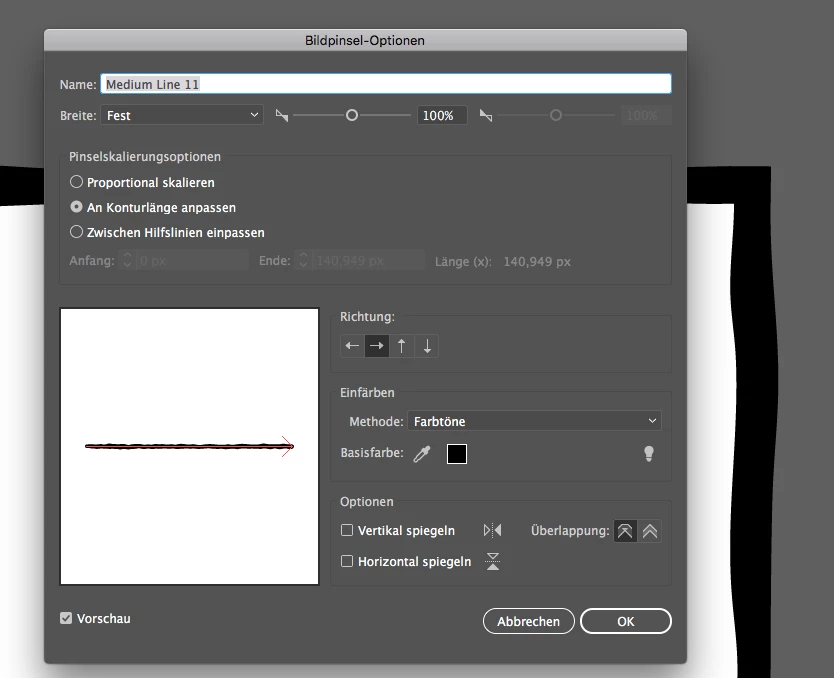
Does anybody know: can I create an art brush which somehow allows to activate the rounded corners in the stroke panel..? If I draw a rectangle or stuff I don't want to activate the rounded corners, I would like to give it a kind of smooth corners. It does not work with the overlapping option.

Is there any way to do that..?

Thanks a lot for your feedback

This topic has been closed for replies.
Correct answer Monika Gause

If you want round corners with an art brush, you will have to round the corners of the path.

4 replies

bad-tasteAuthor
Participant
January 31, 2018

Ah, okay, that's what I wanted to avoid I wanted the brush itself to get smooth edges by enable the rounded corners in the stroke panel.

I just saw it works with the pre-installed standard brushes via stroke panel, but unfortunately not with the pre-installed charcoal brush for example. So I gotta live with rounded corners of the objects

Anna Lander
Inspiring
January 31, 2018

Here is a checking sample of a pre-installed Charcoal Soft brush (other brushes work the same way, whether they are pre-installed or not). Is it what you need?

Monika Gause
Community Expert
Community Expert
January 31, 2018

Usually it won't get round with that setting.

bad-tasteAuthor
Participant
January 31, 2018

thank you guys!

The edges of the brush are already rounded, here it is: Dropbox - brush-test-round-corners.ai hope the link works

Monika Gause
Community Expert
Community Expert
January 31, 2018

You need to round the corners of the object.

Either with the corners widget or with the round corners effect.

Monika Gause
Community Expert
Monika GauseCommunity ExpertCorrect answer
Community Expert
January 31, 2018

If you want round corners with an art brush, you will have to round the corners of the path.

Anna Lander
Inspiring
January 31, 2018

could you please share your brush? I checked the Overlapping mode with some art brushes (standard and my own) and it always worked well.