
Participating Frequently
January 8, 2012
Answered

creating a rhinestone template

  • January 8, 2012
  • 4 replies
  • 61359 views

Does anyone know if there is an ability/plug-in for illustrator cs5 to allow for creating a rhinestone template?  I make custom apparel and use illustrator to create the vector artwork.  When I need a design in rhinestones, I have to send out the art to have the template created (the template is the material with the holes in it where the rhinestones will be placed.) Rhinestone creation software lets you "place" the stones in the on screen design, choosing size of stone, etc.  and then allows that design to be sent to a cutter to cut the holes in the template. If I could do it in-house, it would save me some money.  I know there are plug ins that are compatible with CorelDraw, and there is stand alone software out there for apparel decorators, but I would rather not invest in more software if I could accomplish it in illustrator.
    Correct answer JETalmage

    It would help if you posted a sample image to eliminate guessing about what you're needing.

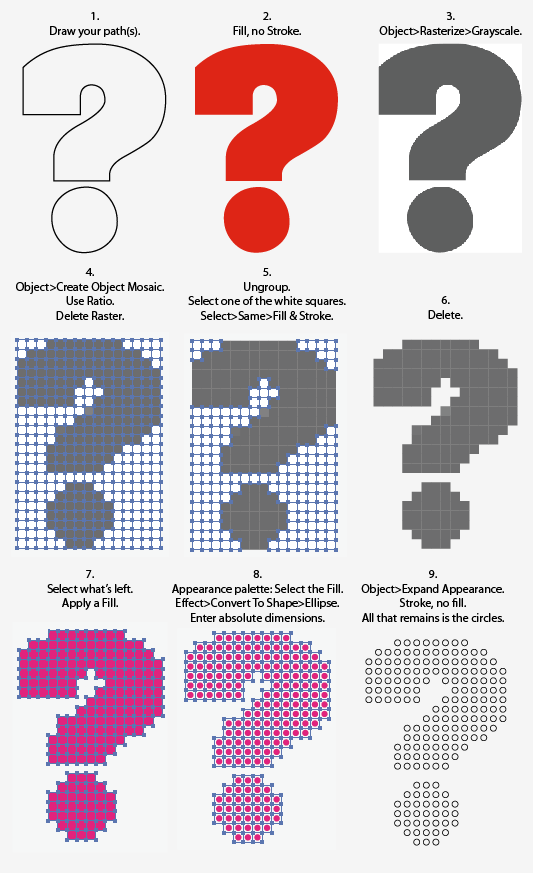
    Based on what I think you've described, you just want to draw shapes and then have them filled with an array of same-sized, uniformly-spaced circles.

    This is one way to do that:

    That's the basic idea. You could semi-automate this by recording the steps in an Action. With a little care, you could build yourself a template that would contain a few Graphic Styles and a few Actions for specific-size circles. You could then design more elaborate patterns by running the various Actions on different elements.

    JET

    4 replies

    Participant
    February 18, 2024

    Hi, if you ever need to do rihinestone letters, google dotted fonts.  I came across the fonts by accident while  looking for marquee letterrs for an invitation i was making for a hollywood theme party . I found a bunch that were free to download.  I  used my Cricut design space program to figure out the stone size. I just uploaded a circle and sized it to whatever stone size i was using. 

    (link removed by moderator)

    Participating Frequently
    September 24, 2013
    artswearAuthor
    Participating Frequently
    September 24, 2013

    Pavel,

    The macro shown in your response is rStones, which is what I currently use, but I use it in Coreldraw.  Does it now work with illustrator?

    Participating Frequently
    September 24, 2013

    Hi.

    Yes, I ported it to illustrator - almost all features (some functioms are not compatible with AI, and some features i had to write by my self). And now it is testing time :)

    I made some changes in bitmap fill feature, but i think people will like them...

    JETalmage
    JETalmageCorrect answer
    Inspiring
    January 8, 2012

    It would help if you posted a sample image to eliminate guessing about what you're needing.

    Based on what I think you've described, you just want to draw shapes and then have them filled with an array of same-sized, uniformly-spaced circles.

    This is one way to do that:

    That's the basic idea. You could semi-automate this by recording the steps in an Action. With a little care, you could build yourself a template that would contain a few Graphic Styles and a few Actions for specific-size circles. You could then design more elaborate patterns by running the various Actions on different elements.

    JET

    Participant
    November 1, 2013

    Hi Jet I know it's been a while since you posted this but I think this is exactly what I am looking for to use in illustrator to create rhine stone designs . I tried your directions several times, but I get to the delet part and everything disappears. when i select one of the white squares, sometimes I can sometimes I can't, if I can ,then when I do select-same-fill and outline it doesn't appear to select all the white squares. If I just type text should I expand it before I rasterize? Am I missing a step? Thanks for any help

    Monika Gause
    Community Expert
    Community Expert
    January 8, 2012

    Like this? http://forums.adobe.com/thread/732621

    Can also be used with circles of even size IIRC

    You could also take a look at the plugin Phantasm CS, which has a vector halftone function.

    artswearAuthor
    Participating Frequently
    January 8, 2012

    Interesting, but this seems to create circles that are touching.  In rhinestoning, there needs to be space in between the stones, so that when it is sent to the cutter, the circles will remain intact to accept each stone. I'm not sure if there is the ability in this software to change the space between the circles, but if so, it may work.   I will check out Phantasm.  Thanks.

    Monika Gause
    Community Expert
    Community Expert
    January 8, 2012

    You can enter a distance. Why don't you just download and try if it suits your need. It's easy to install and use.