Participant
October 31, 2020
Answered

Dashed line that is slanted

  • October 31, 2020
  • 4 replies
  • 4300 views

I use the dashed line feature to impart a pattern over another object. Is there any way to create a dash that is slanted? I would use this to make herringbone patterns. 

This topic has been closed for replies.
Correct answer Ton Frederiks

Good idea.

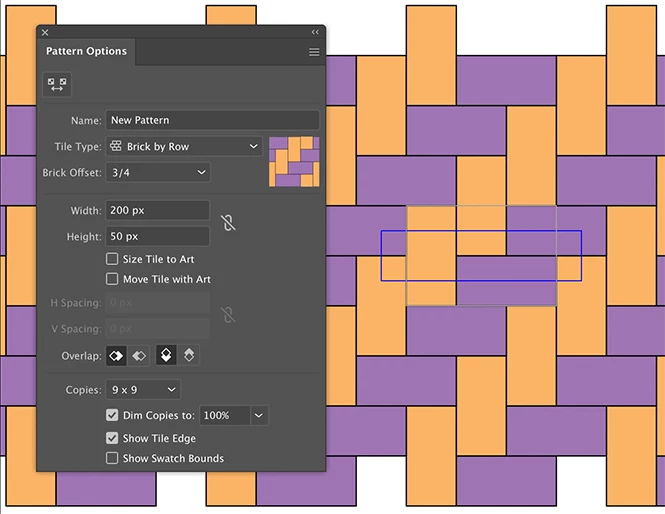
This is similar, but done with 2 rectangles in the pattern maker:
4 replies

kphotopage
Legend
November 1, 2020

Patrick Hi.

You mentioned you want to make herringbone patterns.


Here is another suggestion.

My go to is Effects>Transform.

See image below. I used two Transforms.


Expand Transform.

I then created a Pattern Swatch


K

Ton Frederiks
Community Expert
Ton FrederiksCommunity ExpertCorrect answer
Community Expert
November 1, 2020

Good idea.

This is similar, but done with 2 rectangles in the pattern maker:

kphotopage
Legend
November 1, 2020

Cool Ton! You fine tuned.


K


Mike_Gondek10189183
Community Expert
Community Expert
October 31, 2020

Great Question. 


1- Custom brush pattern

2- Custom brush pattern using a masked repeating pattern to help bounding box issue

3- Artbrush

4- Transform effect on a circle grouped with 2 dashes (1 black other none)


Let us know exactly what you are finally trying to achieve as your need may be simple or more advanced


Participant
November 2, 2020

It is rather simple and perhaps undeserving of all your wonderful techniques.


I am drawing a wire rope. Currently, it has a bounding box with another, thicker line on top of it to give a rounded effect. Since the wire rope is composed of strands of smaller wire, diagonal lines would make it look more convincing. The diagonal lines would need to follow the shaded line, or be confined to the bounding box.


Elsewhere, I used a technique to represent weld-beads that uses a narrow, shaded line with a wider dashed line on top of it to represent the undulations of welded metal. I thought something similar might be possible for the rope. 

Monika Gause
Community Expert
Community Expert
November 2, 2020

In InDesign there is a premade stroke with diagonal dashes.

In Illustrator you would use a pattern brush.

Myra Ferguson
Community Expert
Community Expert
October 31, 2020

In addition to Kurt's suggestion, you could try a Blend between 2 slanted dashes, or you could select it and go to Effect > Distort & Transform > Transform and make copies that are Moved a specified distance. The slanted dashes made with the effect are copies of the original line, but you could turn the copies into objects by going to Object > Expand Appearance.

Kurt Gold
Community Expert
Community Expert
October 31, 2020

You could create custom pattern brushes (or scatter brushes).