


faded print result

Copy link to clipboard
Copied
Hi,
I am printing black and white vector images. Some files i am getting a nice rich black print while other files i am getting a faded black print. I can't seem to work out what settings are different on the faded ones. If anyone can give me some tips.
Thanks Barbara



Explore related tutorials & articles
 18
Replies
18
18
Replies
18


Copy link to clipboard
Copied
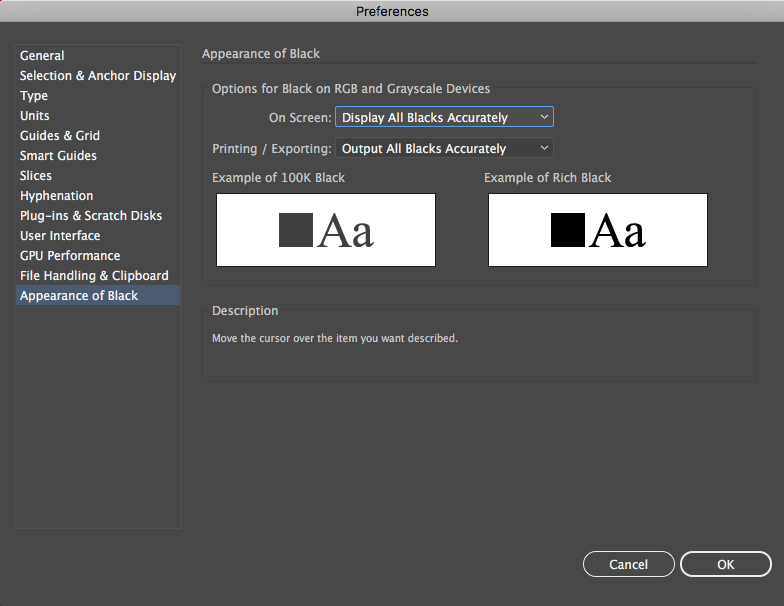
from an rgb or cmyk doc? do you mean rich black in the technical sense (i.e. a combination of K and other colours) or colloquial? what do the illustrator preferences say under 'Appearance of black'?

Copy link to clipboard
Copied
To get a rich black you should use these values: C40 M40 Y40 K100 (for CMYK printing). If you are using black color with just the 100 K you'll get a faded black ... To properly view the blacks set preferences like this:
Copy link to clipboard
Copied
Thabk you. I tried this and still got a faded print. I printed in rgb and got a solid print but can't seem to get a solid print for another one in rgb. Not sure what I am doing wrong trying to match the setting with the one that is printing correctly.
Sent from my iPhone

Copy link to clipboard
Copied
Barbara1979 schrieb:
Not sure what I am doing wrong trying to match the setting with the one that is printing correctly.
Why not start by describing what you're doing with the correct one? Also from Illustrator?
And please: show them. Screenshots and photo of the printout.
Also: Which version?
Which printer?
Which system?
Do you know about color management?
Copy link to clipboard
Copied
I am using version 16.0.4
Laser printer
Mac
In the solid print I am getting a nice shiny finish and the faded one is a dull matt. When I switched the file from cmyk to rgb I got a shiny black print. I tried that on the teepee print and it didn't work still a full matt grey. I printed over the top of it to hopefully show the difference.
Sent from my iPhone
Copy link to clipboard
Copied
There are no images in your post.
Which Mac OS?
Which printer exactly?
Which color management settings and printer setup?
How is color defined?
Have you compared the color values in the files?
Copy link to clipboard
Copied
Laser canon LPB9100cdn
OS X El Capitan
let illustrator determine colours
Srgb
Relative Colourimetric
I have compared the colour values in both files that are printing how i like them and they don't work.
Not sure colour defined.
Copy link to clipboard
Copied
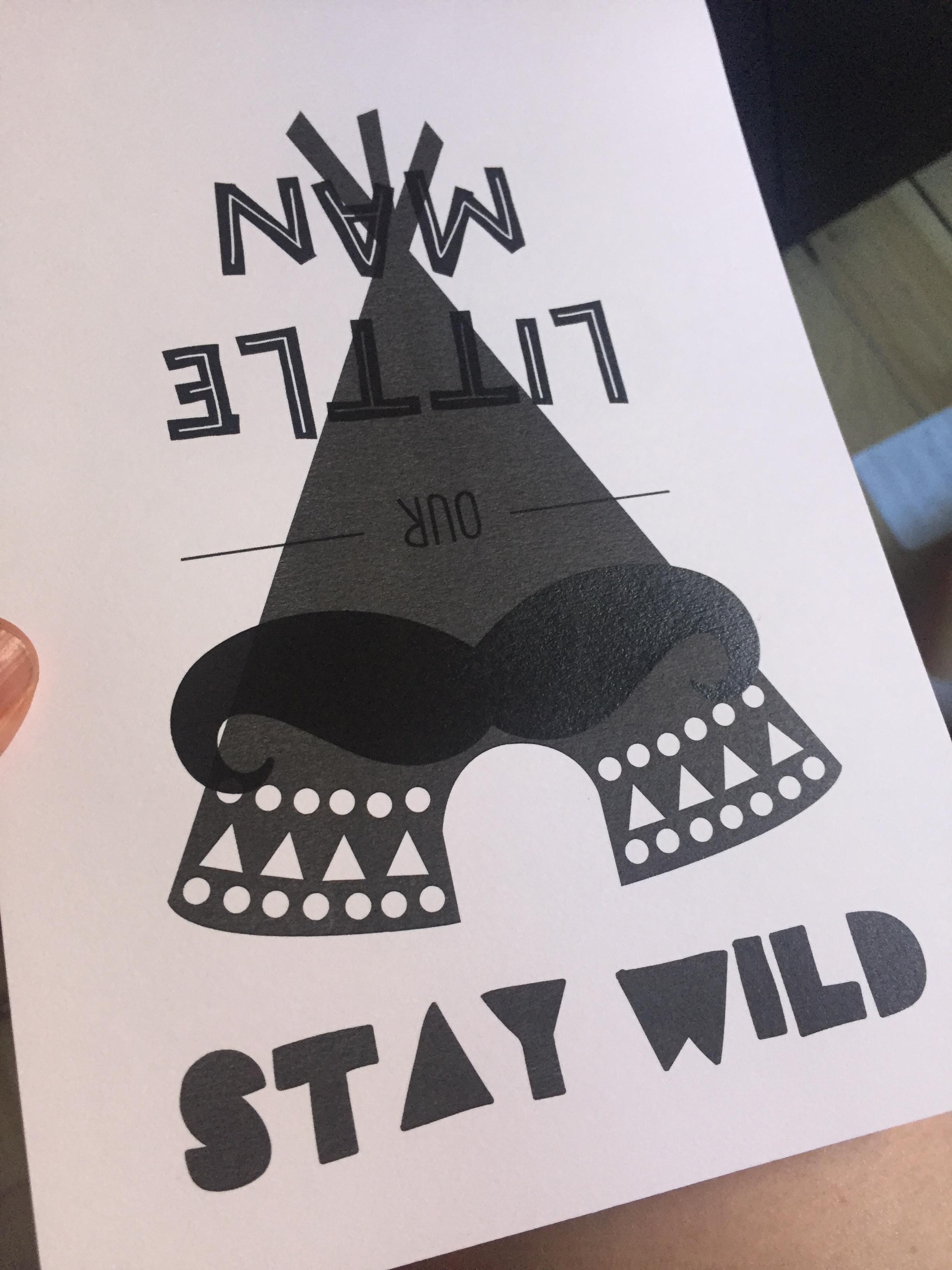
Copy link to clipboard
Copied
So you are printing RGB documents?
Please check how color is defined in the documents.
Copy link to clipboard
Copied
The file is created as a cmyk
The srgb come up in the colour management in the print options.
Sent from my iPhone
Copy link to clipboard
Copied
Please answer precisely, otherwise this won't get us anywhere.
Which file is CMYK?
Which color is assigned to the objects?
Which options exactly are set up for printing for both files?

Copy link to clipboard
Copied
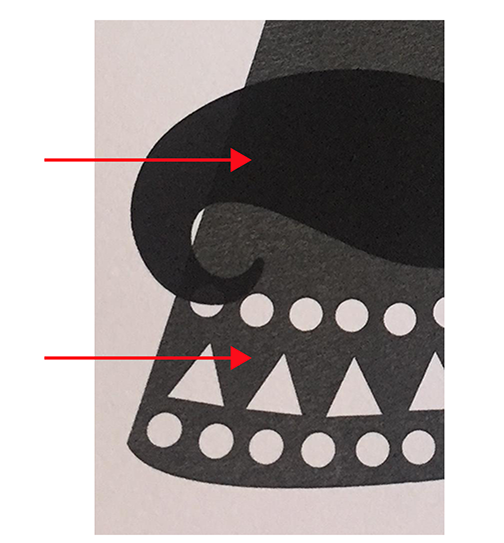
If you select these, what values do you see in your color panel?
Copy link to clipboard
Copied
I get a nice black from both of these colour values. I have tried both on the file and not getting a nice black only faded
H 344% S 11% B-0 R-0 G-0 B-0 C-0 M-0 Y-0 K 100%
H 344 S-11% B-0 R-0 G-0 B-0 c-75% M-68% Y-67% K-90%
I have also tried the colour value given early on and also 20/20/20/100
Copy link to clipboard
Copied
But there is a big difference looking at your picture and you have 2 totally different values.
The top "moustache" one looks black to me, what value does that have?
Copy link to clipboard
Copied
thank you, i seemed to have worked it out. I loaded to files into photoshop and changed the colour setting to 250% ink coverage and black generation heavy.
I am getting a nice black on all prints.
I will try and do the same in illustrator.
Copy link to clipboard
Copied
I am afraid that your solution brings back the dark ages of color management.
You will probably not get very accurate color separations this way.
Why not use the setting in the Illustrator Preferences > Appearance of Black > Printing/Exporting > Output All Blacks as Rich Black.
That way the 2 different blacks you are using will print as rich black.
Copy link to clipboard
Copied
Ok thank you. I will try this.
Sent from my iPhone
Copy link to clipboard
Copied
Maybe you did use a 100% Grayscale value for the one and 100% Black for the other?


Find more inspiration, events, and resources on the new Adobe Community
Explore Now
 AdChoices