
Participant
April 11, 2018
Answered

Flag Warp Driving me Mad

  • April 11, 2018
  • 2 replies
  • 1184 views

So I have a filled rectangle with some words within.

I want to warp this, so the rectangle and text wave like a flying flag

Except, when I apply Effects>Warp> Flag... the preview is grayed out and no matter what settings I make, nothing happens, nothing is applied.

I've tried, creating outlines then trying, saving as eps they trying, Saving as a jpg and then trying.  No matter what, NONE of the warp effects is working for me

`What am I missing.  Thanks

iMac

Illustrator CC 22.1
    This topic has been closed for replies.
    Correct answer Mike_Gondek10189183

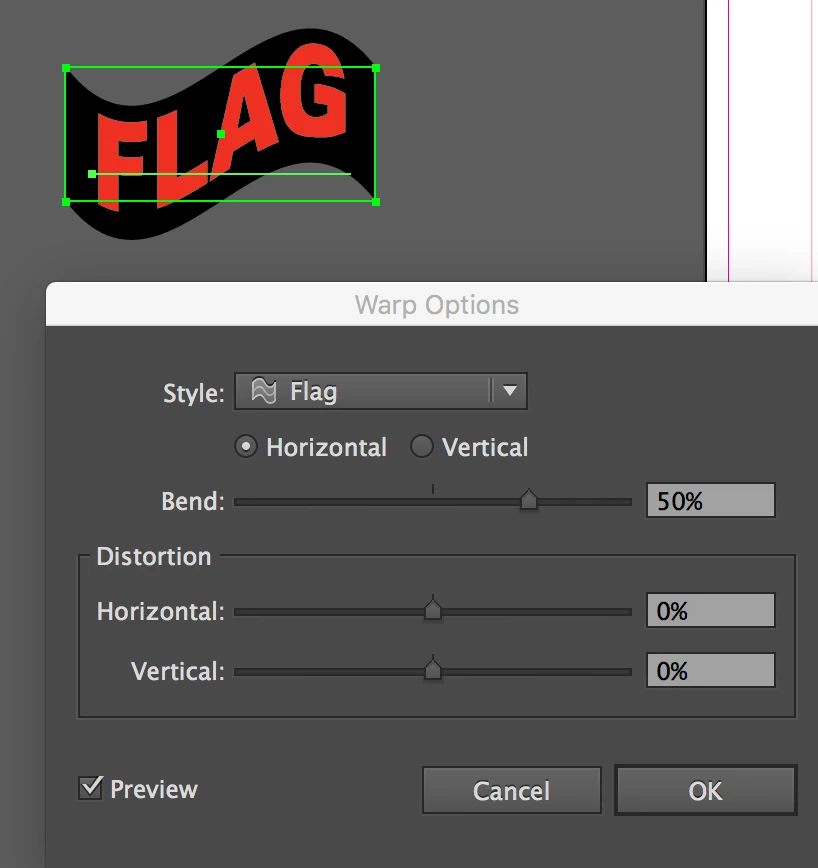
    Make sure you have your item selected, then try using the effect >> warp >> flag.

    I never use object >> envelope distort as much better to use the editable live effect. Post a screenshot if you are still having troubel as can help us see what else might be causing this.

    2 replies

    Mike_Gondek10189183
    Community Expert
    Mike_Gondek10189183Community ExpertCorrect answer
    Community Expert
    April 11, 2018

    Make sure you have your item selected, then try using the effect >> warp >> flag.

    I never use object >> envelope distort as much better to use the editable live effect. Post a screenshot if you are still having troubel as can help us see what else might be causing this.

    Participant
    December 1, 2024

    I believe this is what I'm looking for, to make 3 lines of type to wave as a flag in a light breeze gif. 

     But never used LR before - wish me luck. 

    Cheers 

    Cheers

    Monika Gause
    Community Expert
    Community Expert
    April 11, 2018

    Please show.