

UlfLaursen
Inspiring
October 29, 2017
Answered

Font appearence

  • October 29, 2017
  • 2 replies
  • 798 views

hi there

i have a strange thing happening to me.

i have a font called “buffet script”. If I use it in photoshop the appearence is in one way, but if I use it in Illustrator, it is different. The “sample” in the selection drop down menu is the same in both programs.

the waybit is shown in the “sample” is the correct way, and the way the appearence is in PS.

thanks.

ulf
    This topic has been closed for replies.
    Correct answer

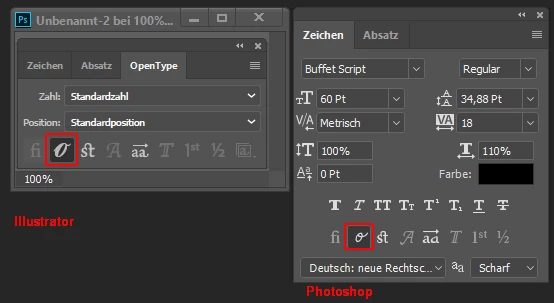
    That are OpenType variations.

    It seems that Photoshop and Illustrator are someway different when displaying the OpenType variations of characters.

    You can switch between the OpenType variations in the Character panel, and you can compare them in the Glyphs panel.

    Fenja

    2 replies

    Correct answer
    October 29, 2017

    That are OpenType variations.

    It seems that Photoshop and Illustrator are someway different when displaying the OpenType variations of characters.

    You can switch between the OpenType variations in the Character panel, and you can compare them in the Glyphs panel.

    Fenja

    UlfLaursen
    Inspiring
    October 31, 2017

    T

    Thanks Guys - above are two screenshots, one from photoshop, which is the correct appearance and one from Illustrator. I chose the exact same font, I believe, in both apps.

    UlfLaursen
    Inspiring
    October 31, 2017

    THANKS Fenja - that did the trick!!

    /Ulf

    Larry G. Schneider
    Community Expert
    Community Expert
    October 29, 2017

    A little hard to help without seeing what you are talking about. Can you include some screenshots showing the problem? Use the Insert Image icon (seventh from left) in the reply dialog menu. Also what OS and version and what version of AI?