



Get menu command strings
I recently needed a way to fit the artboards into view and learned that I can do it using app.executeMenuCommand("fitall"). When I searched through the scripting PDFs, I've found no mention of this method.
Then I was made aware of this question [JS] CS6+ executeMenuCommand2. There are lists of commands and some links in the answers. I've visited the links and this AI CS6 `app.executeMenuCommand` was the most enlightening one as to where and how to get these commands. So I followed what the author did.
- Create a new document
- Profile: Print
- Size: Letter
- Create a new Action set
- Name it "My Set"
- Create a new Action inside the new set
- Name it "Fit artboard"
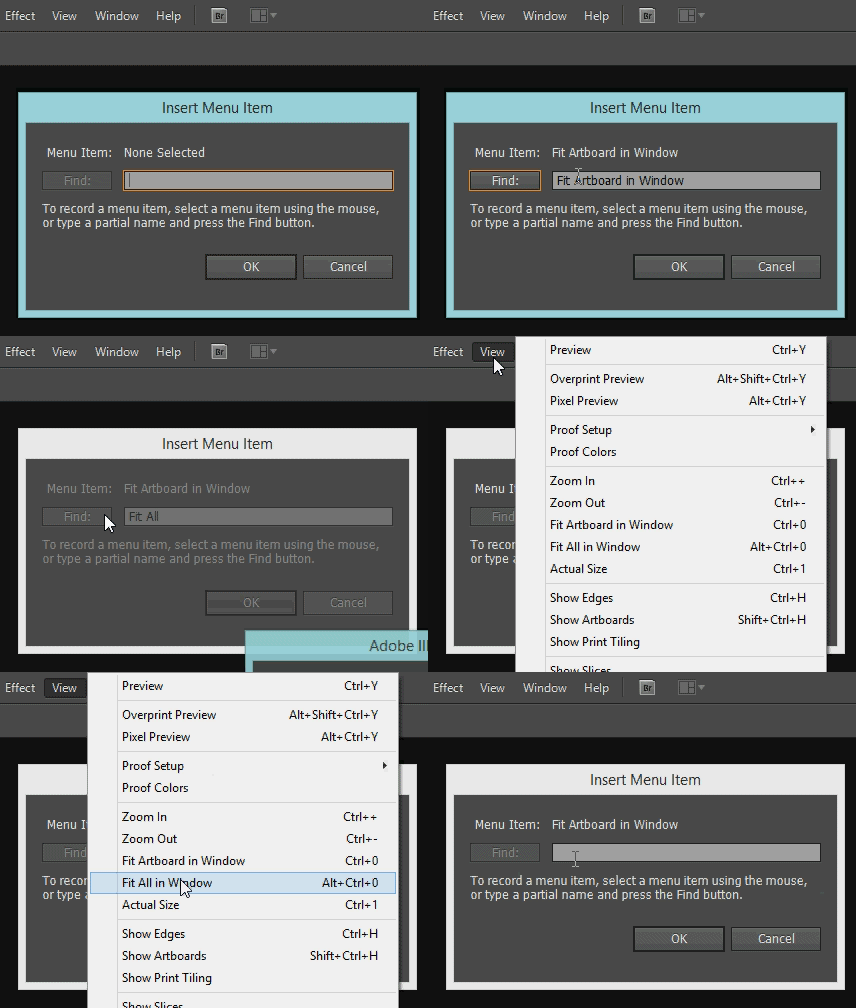
- Insert menu item
- Select View->Fit Artboard in Window.
- Click OK
- Save Actions to file
- File name is "My Set.aia"
When I examine the "My Set.aia" file, I see there are 3 parameters. The first is the menu command. The second is the name of the command. I don't know what the third is. Parameter values are in hex format. Once I convert "666974696e" into ASCII, I get "fitin", the menu command string for "Fit Artboard in Window".
/parameter-1 {
/key 1769238125
/showInPalette -1
/type (ustring)
/value [ 5
666974696e
]
}
See the original and the converted action files.
I've tested this with few other commands and it seems to work. Although I couldn't make it work for "Fit All in Window". When inserting menu item in Actions, selecting View->Fit All in Window does nothing. Typing "Fit All in Window" and clicking on "Find" also doesn't work. Gives the warning "No menu item matching that name was found". Why is that?
Sigh. I wish there was an official documentation for app.executeMenuCommand() and these commands were easier to access.


 AdChoices