Participating Frequently
April 8, 2011
Resuelto

Get Rid of 3D Drawing Guide?
  • April 8, 2011
  • 1 respuesta
  • 27290 visualizaciones

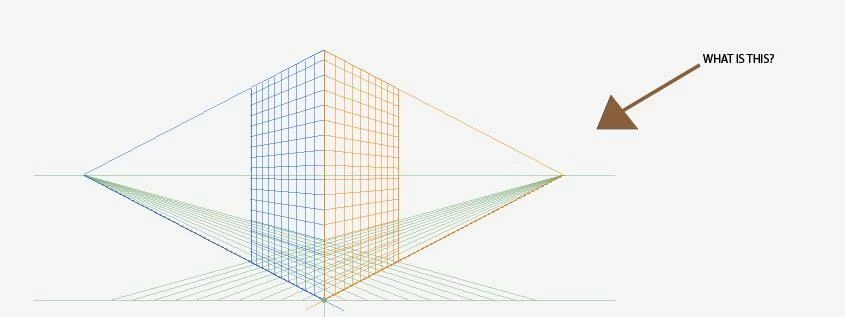
Hello!  I don't know what this is or how I put it on my artboard; how do I get rid of it?  Thank you!

    Este tema ha sido cerrado para respuestas.
    Mejor respuesta de Joe Paris

    It's the Perspective Grid. Shift+Ctrl+I will toggle it on and off. View>Perspective Grid>Hide grid does the same and if your curiosity gets the better of you then the Help files will supply you with ways to make use of it. You may have accidentally clicked on the Perspective Grid Tool, just above the Mesh Tool

    1 respuesta

    Joe Paris
    Joe ParisRespuesta
    Participating Frequently
    April 8, 2011

    It's the Perspective Grid. Shift+Ctrl+I will toggle it on and off. View>Perspective Grid>Hide grid does the same and if your curiosity gets the better of you then the Help files will supply you with ways to make use of it. You may have accidentally clicked on the Perspective Grid Tool, just above the Mesh Tool

    Participant
    June 9, 2011

    And maybe you can help me!? I'm intentionally using the Persp. Grid Tool, and after watching an Adobe TV tutorial, I think I'm supposed to be able to move an object from one plane to another, changing perspective, while dragging it and holding "1". but I'm not getting that. Know anything?

    Thanks. Oh, and I may have a follow-up question but don't want to throw to much out there at once.

    Monika Gause
    Community Expert
    Community Expert
    September 12, 2015

    The question is how to get rid of it - clicking on the x does not work - but that is Adobe, useless, useless, adobe - bugs remain for years while prices go up and mostly worthless new features are added.


    Have you even read the complete thread before yelling "useless"?

    You get rid of it by pressing Cmd+Shift+I. PressCtrl instead of Cmd on Win.