
Participant
January 26, 2018
Answered

Gradually increase space between a series of identical objects

  • January 26, 2018
  • 1 reply
  • 2666 views

I would like create a series of identical objects with gradually increasing space between them.  Ideally I could use this as a brush but I would settle for some type of blend option that I could manually apply.  Any ideas?  I've looked through several similar threads without a clear answer.
    This topic has been closed for replies.
    Correct answer tromboniator

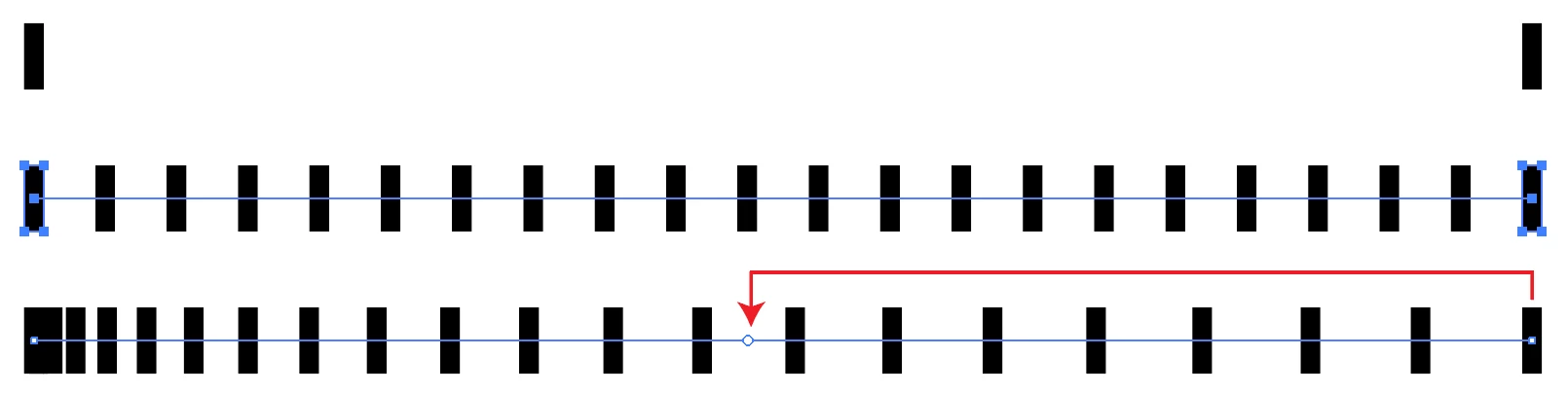
    Make a blend between two objects, set how many steps you want in the Blend Options. With the Direct Selection Tool, or in the Layers panel, select the spine of the blend. With the Anchor Point Tool drag a handle from one end of the blend toward the other end until you get the kind of separation you want. If you want to make a brush out of it, expand the blend.

    I know of at least one other way to do this, but it's way past my bedtime.

    Peter

    1 reply

    tromboniator
    Community Expert
    tromboniatorCommunity ExpertCorrect answer
    Community Expert
    January 26, 2018

    Make a blend between two objects, set how many steps you want in the Blend Options. With the Direct Selection Tool, or in the Layers panel, select the spine of the blend. With the Anchor Point Tool drag a handle from one end of the blend toward the other end until you get the kind of separation you want. If you want to make a brush out of it, expand the blend.

    I know of at least one other way to do this, but it's way past my bedtime.

    Peter