


- Home
- Illustrator
- Discussions
- How can I edit graph data from an Imported Graph T...
- How can I edit graph data from an Imported Graph T...
How can I edit graph data from an Imported Graph Template from Creative Cloud?

Copy link to clipboard
Copied
Hi,
I downloaded a graph from the creative cloud's selection of templates, and I am unable (or can't figure out) how to edit the data of the graph so that it illustrates my data.
I've tried selecting the graph and then objet>graph>data however the data table is empty and unable to input variables. Do i have to be merging a .csv file into the graph or are templates totally bereft of connection to data and are just shapes to be manipulated manually to try and illustrate data points?
Really confused, and I'm also slightly new to Illustrator as well.
Thanks for any help



Explore related tutorials & articles
 9
Replies
9
9
Replies
9



Copy link to clipboard
Copied
Sorry about that:
it was one of those free templates? do you have the name?
Maybe the creator didn't include the graph
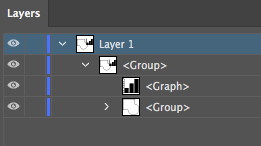
go to the layers panel and maybe is inside a group
E
Copy link to clipboard
Copied
Hi Eugenio,
I've tried it on 2 different (not free) templates, this being one of them: Graphs stock graphic design and motion graphic templates | Adobe Stock
In the layers of it, I can't really find much. What would I be able to do in the specific layers regarding data?
Is there a way to integrate/input data into a template like this at all?
Thanks,
Miguel


Copy link to clipboard
Copied
The graph is not tied to data, it is not a "live" graph that can be changed using Illustrator's Graph tools.
The only thing you can do is modify/duplicate the objects manually.

Copy link to clipboard
Copied
What adds to the problem is that there actually are some very rare editable Illustrator charts on Adobe Stock. They come as templates with step by step instructions on how to edit them.
The difficulty for people will be to tell the editable and the uneditable apart.
Copy link to clipboard
Copied
Yea, that was exactly my concern! I knew there was a chance some of these graphs are uneditable but I was concerned that I wouldn't be able to tell, just based on my basic Illustrator knowledge. I guess if you can't access/edit the data in the graph it is uneditable and essentially just an editable image instead of a graph.
Would be nice to have this information available in Adobe Stock.

Copy link to clipboard
Copied
can you post a link to one such as this??? I have been looking for AWHILE...
Copy link to clipboard
Copied
Do you know where these are?


Copy link to clipboard
Copied
Hi Miguel,
Please check out this tutorial: Illustrator CC Charts 2 - How to make and edit a pie chart - YouTube.
Hope it helps!
Regards,
Srishti
Copy link to clipboard
Copied
Did you every find any editable templates??


Get ready! An upgraded Adobe Community experience is coming in January.
Learn more
 AdChoices