Exit
  • Global community
    • Language:
      • Deutsch
      • English
      • Español
      • Français
      • Português
  • 日本語コミュニティ
  • 한국 커뮤니티
0

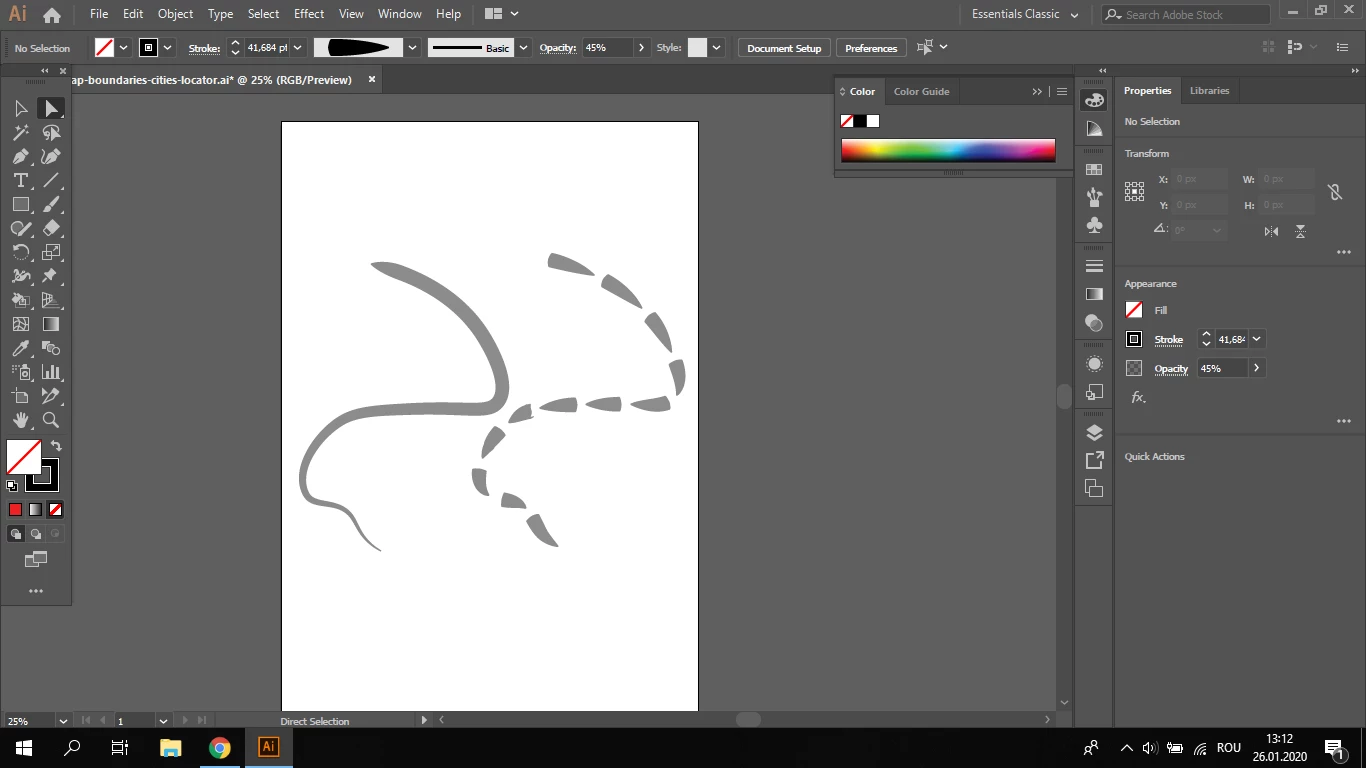
How do I cut this line without losing it's actual shape?

Explorer ,
Jan 26, 2020 Jan 26, 2020

Hi,

I want to to cut this line into multiple parts, but when I try, it divedes into multple ''arrow'' like shapes wich I don't want.

Thanks.
Captură ecran (7).png

TOPICS
Draw and design , Tools
2.1K
Translate
Report
Community guidelines
Be kind and respectful, give credit to the original source of content, and search for duplicates before posting. Learn more
community guidelines

correct answers 1 Correct answer

Community Expert , Jan 26, 2020 Jan 26, 2020

If you cut a line that has a width profile applied, you will apply it to all the separate parts.

You can Object > Path > Outline Stroke first and use the Knife tool to cut it.

Translate
Adobe
Community Expert ,
Jan 26, 2020 Jan 26, 2020

If you cut a line that has a width profile applied, you will apply it to all the separate parts.

You can Object > Path > Outline Stroke first and use the Knife tool to cut it.

Translate
Report
Community guidelines
Be kind and respectful, give credit to the original source of content, and search for duplicates before posting. Learn more
community guidelines
Enthusiast ,
Jan 26, 2020 Jan 26, 2020
LATEST

Expand appearence first, then cut the line.

Translate
Report
Community guidelines
Be kind and respectful, give credit to the original source of content, and search for duplicates before posting. Learn more
community guidelines
