
Participant
November 1, 2016
Question

How do I display the CMYK Color Sliders?

  • November 1, 2016
  • 4 replies
  • 23777 views

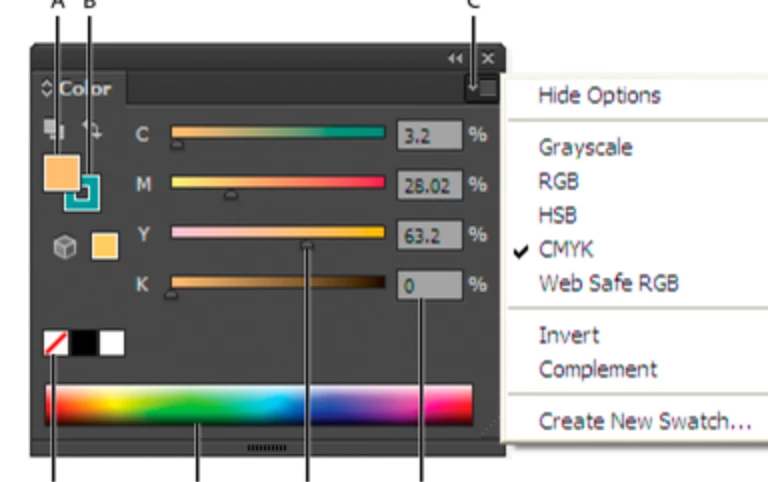
I have just installed Illustrator CC (2015.3). I can't figure out how to get the color sliders to display in the color bar on the right. I know how to create a new color swatch in the pop-up light box, but I just want the CMYK sliders available in the tool bar like all the older versions of illustrator. What I am looking for is attached to this post. I found an image of it online to take a screenshot, but I can't find instructions on how to keep the sliders always visible in my color tool bar. Any help would be appreciated.

Thanks!
    This topic has been closed for replies.

    4 replies

    Theresa J
    Community Expert
    Community Expert
    May 15, 2018

    You are referring to the Color Panel. This panel is no longer part of the Illustrator Essentials workspace. You can open the Color panel by choosing Color from the Window menu. Or you can change your workspace to the Essentials Classic workspace.

    If the color Panel opens without the sliders, click on the Swatch options which is labeled “C” in your screen shot. Chose show options. From this menu you can also pick CMYK for the sliders. Shift clicking on the color ramp will toggle through all of the color mode slider options.

    If you want the Color panel to always open like this, save a new workspace. This option is found in the upper right of the screen. This page has more info about custom workspaces How to customize the Illustrator workspace

    Participant
    May 15, 2018

    try

    window -> color

    drag and drop the color panel into swatch panel or any panel you want.

    that's all, hope can help.

    Mike_Gondek10189183
    Community Expert
    Community Expert
    November 1, 2016

    Your color panel may be in the wrong mode. Click on the up down arrows a few times to go through the different modes.

    Once you get the color panel in the mode that shows the numbers, then you can use the flight menu if needed to change form RGB to CMYK for example.

    Monika Gause
    Community Expert
    Community Expert
    November 1, 2016

    Are you referring to the color panel or the pop up in the control bar?

    Please take a screenshot of your setup and your problem.