Participant
February 23, 2021
Answered

How do i get rid of weird Corners in Illustrator

  • February 23, 2021
  • 2 replies
  • 2577 views

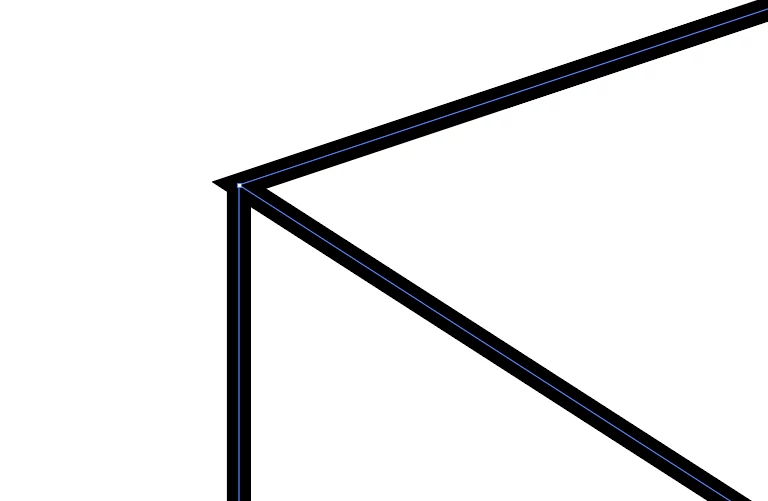
Hello i have this Problem in Illustrator that when i conect 3 lines to a Corner that it creates this weird sharp Corner.

Does someone know how to fix this? 

Thank you!

This topic has been closed for replies.
Correct answer John Mensinger

Doug's right; technically, the 3 segments aren't joined, but in any case, you can clean up the corner.


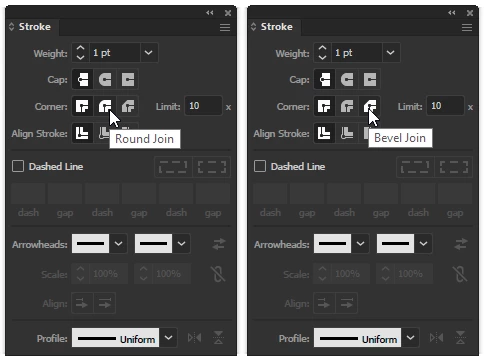
With the strokes selected, click either the Round Join or Bevel Join button in the Stroke panel.
2 replies

John Mensinger
Community Expert
John MensingerCommunity ExpertCorrect answer
Community Expert
February 23, 2021

Doug's right; technically, the 3 segments aren't joined, but in any case, you can clean up the corner.


With the strokes selected, click either the Round Join or Bevel Join button in the Stroke panel.

NITRO24Author
Participant
February 23, 2021

Thank you thats a good solution, it would have taken ages to figure it out myself.

Thanks a lot!

Doug A Roberts
Community Expert
Community Expert
February 23, 2021

You can't connect three lines to a corner. That corner is the join between the two lines forming an acute angle.

NITRO24Author
Participant
February 23, 2021

Thanks for your reply, but how can fit the 3rd line in there?

I will post another picture, so you can maybe see what I'm trying to do and help me to solve the problem.

Thank you I really appreciate the help!