

How do I update a plug in?!
I am a novice at best when it comes to troubleshooting, so I am really hoping for a simple answer but multiple attempts at searching for it have yielded me nothing.
How do I update a plug in that requires updating? Or how do I uninstall a specific update and install the most up to date version?
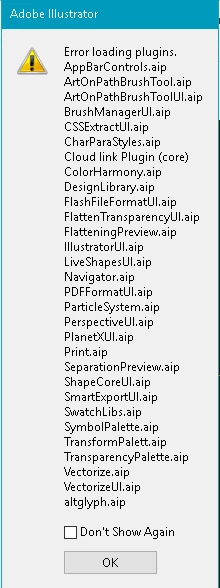
I am running AI CC 2017 and it fails to launch ever time. I am attaching the pop up I get now, which I had to uninstall and reinstall Illustrator enterirely to get that much.
Diagnostic testing says that the following plug ins are the problem. I can locate them in program files but I don't know what to DO with them, I mean, I can delete them but I don't know if that is right or what to do to get them back.
CharParaStyles.aip
PlanetXUI.aip
altglyph.aip
AppBarControls,aip
FlatteningPreview.aip
Navigator.aip
DesignLibrary.aip
SmartExportUI.aip
SeparationPreview.aip
SymbolPalette.aip
TransformPalette.aip
TransparencyPalette.aip
IllustratorUI.aip
 AdChoices