Participant
December 31, 2017
Answered

how to create pattern in ai script

  • December 31, 2017
  • 2 replies
  • 4068 views

in aiscript,i create a placeitem(picture),and i want to use it to fill the pathitem.like this:

var r=new patterncolor();

patterncolor.pattern=the pictue i want

pathitem.fillcolor=r;

so,how to convert placeitem to pattern.or how to filled the pathitem by the picture i want?

Correct answer CarlosCanto

Hi trymoremore, unfortunately we can't create pattern swatches from PlacedItems using new PatternColor().

As a workaround you can record an action to Make a Pattern, then you can play such Action using doScript() function.

to record an action to turn placedItems into Pattern Swatches

1. select your placed item

2. embed it

3. open Actions Panel, start recording

4. Insert Menu Item...(in Actions Panel Flyout Menu)

5. Object->Pattern->Make

6. Exit Pattern Editing Mode (in Layers Panel Flyout Menu)

7. Stop Recording
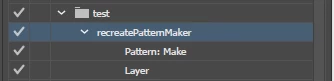
then in your script, with your embedded placed item selected use

app.doScript("yourActionName", "yourActionSetName")

in my example, it would be

app.doScript("recreatePatternMaker", "test")

2 replies

Known Participant
February 13, 2020

Just found this script that could cover steps 1 & 2:

#target Illustrator

if ( app.documents.length > 0 ) {
    while ( app.activeDocument.placedItems.length > 0 ) {
        placedArt = app.activeDocument.placedItems[0];
        placedArt.embed();
    }
}

 Source: https://graphicdesign.stackexchange.com/a/71642

pixxxelschubser
Community Expert
Community Expert
December 31, 2017

Hi trymoremore​,

you are here in the illustrator main forum - that's the wrong forum for your question.

How good is your scripting knowledgebase?

Perhaps a Moderator can move this thread to the right forum: Illustrator Scripting

I think you doesn't mean the following kind of pattern. Please explain in detail with screenshot (and perhaps with example ai-file) what you really want.

For the beginning a sample code in [JS] (read and alert the name of swatches with pattern):

var doc = activeDocument;

var theSwatches = doc.swatches;

for (var i=0; i <= theSwatches.length-1; i++) {

    swatchType = theSwatches.color.typename;

    swatchName = theSwatches.name;

    // alert name of pattern swatch

    if (swatchType == "PatternColor") {alert(swatchName)};

}

Have fun and a Happy New Year 2018

Participant
January 2, 2018

thank you for your patience and please forgive me for not responding promptly.

i want to filled the pathitem by the picture i want just like this :

my idea is create a placeitem ,and convert the placeitem to pattern.then,create a patterncolor and Specify its “pattern” as the pattern the placeitem convertd. at last,use the patterncolor fill the pathitem.

So,what i don't know is how to convert placeitem  to pattern.

this is my code:

var patternColors = new PatternColor();

patternColors.pattern=pattern the placeitem convert;

pathitem.fillColor=patternColors;

CarlosCanto
Community Expert
CarlosCantoCommunity ExpertCorrect answer
Community Expert
January 3, 2018

Hi trymoremore, unfortunately we can't create pattern swatches from PlacedItems using new PatternColor().

As a workaround you can record an action to Make a Pattern, then you can play such Action using doScript() function.

to record an action to turn placedItems into Pattern Swatches

1. select your placed item

2. embed it

3. open Actions Panel, start recording

4. Insert Menu Item...(in Actions Panel Flyout Menu)

5. Object->Pattern->Make

6. Exit Pattern Editing Mode (in Layers Panel Flyout Menu)

7. Stop Recording

then in your script, with your embedded placed item selected use

app.doScript("yourActionName", "yourActionSetName")

in my example, it would be

app.doScript("recreatePatternMaker", "test")