
September 19, 2018
Answered

How to cut a screenshot using the scissors /knife tool?

  • September 19, 2018
  • 4 replies
  • 1539 views

I just copy pasted a screenshot of an image from Google onto the illustrator artboard and I want to cut portions of it. How do I cut it using the scissors /knife tool because they don't seem to be working?

Pls help

Edited: Anna Lander
    This topic has been closed for replies.
    Correct answer mjbelt

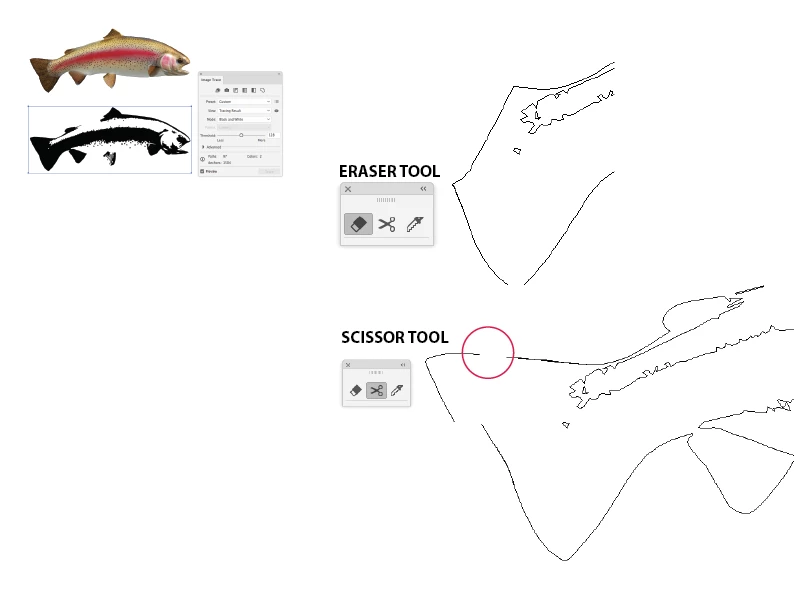
    It’s best to use Image Trace in Illustrator

    https://helpx.adobe.com/illustrator/using/tracing-artwork-live-trace-or.html

    The eraser and scissor tools behave differently when editing vector points.

    Eraser Tool will close up the path, and Scissor Tool will open.

    4 replies

    mjbeltCorrect answer
    Participating Frequently
    September 19, 2018

    It’s best to use Image Trace in Illustrator

    https://helpx.adobe.com/illustrator/using/tracing-artwork-live-trace-or.html

    The eraser and scissor tools behave differently when editing vector points.

    Eraser Tool will close up the path, and Scissor Tool will open.

    Legend
    September 19, 2018

    Pass your image via Photoshop where you can do the raster stuff, before you combine rasters with vectors in Illustrator.

    Ton Frederiks
    Community Expert
    Community Expert
    September 19, 2018

    Or, when it is a rectangular part of the image, use Object > Crop Image.

    Inspiring
    September 19, 2018

    Of course not because Illustrator is not able to edit pixel based images (as screenshots are). Try to use a clipping path instead.