
SugarLady16
Participant
November 15, 2016
Answered

How To Cut Or Make Clipping Mask Of A Shape Inside Of An Image?
  • November 15, 2016
  • 3 replies
  • 2305 views

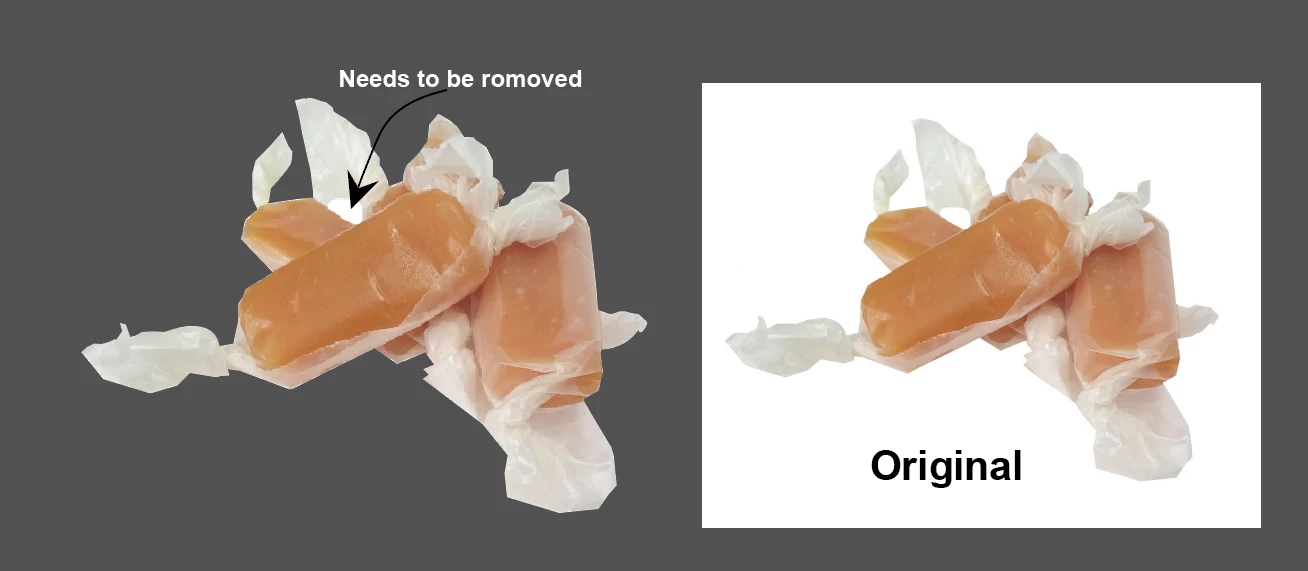
I have been trying to figure this out for awhile now. Is there a way I can cut or make a clipping mask of a shape inside an image or make a part of the image transparent in AI? I am aware of how to remove a shape inside a shape. Does this HAVE to be done in Photoshop?

    This topic has been closed for replies.
    Correct answer Jacob Bugge

    sugarlady,

    As I (mis)understand the image, the simplest way would be to just select the white path and the image, then click Make Opacity Mask in the Transparency palette flyout with Clip unticked and Invert Mask ticked.

    3 replies

    Mike_Gondek10189183
    Community Expert
    Community Expert
    November 15, 2016

    I would recommend to make/edit you mask in photoshop. Illustrator preview is very good, but not as accurate as Photohsop's. You also could do a better job of for example making the wax paper semitransparent with grays, if you needed to for example drop this image over a nonwhite background.

    This is quick and rough

    But quite convincing

    SugarLady16
    Participant
    November 16, 2016

    Thanks for the tip!

    Mike_Gondek10189183
    Community Expert
    Community Expert
    November 16, 2016

    In the words of a wise man~

    For my part you are welcome, SugarLady.

    Jacob Bugge
    Community Expert
    Jacob BuggeCommunity ExpertCorrect answer
    Community Expert
    November 15, 2016

    sugarlady,

    As I (mis)understand the image, the simplest way would be to just select the white path and the image, then click Make Opacity Mask in the Transparency palette flyout with Clip unticked and Invert Mask ticked.

    SugarLady16
    Participant
    November 16, 2016

    Perfect! Thanks!

    Jacob Bugge
    Community Expert
    Community Expert
    November 16, 2016

    For my part you are welcome, SugarLady.

    Kris Hunt
    Legend
    November 15, 2016

    Make a compound path out of the two paths first, and then use that to create your mask.