Inspiring
August 29, 2011
Question

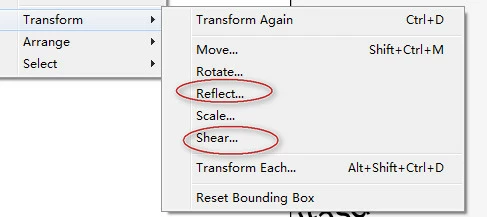
How to make reflect or shear transform for a art?
  • August 29, 2011
  • 1 reply
  • 1076 views

I want to make  reflect  or shear transform for a art by sdk,but there is only

move ,rotate, scale function in sdk,see:
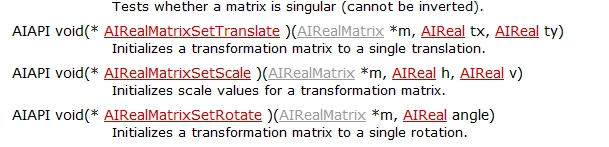
How to make  reflect  or shear transform for a art?

This topic has been closed for replies.

1 reply

A. Patterson
Inspiring
August 29, 2011

A reflection is just a negative scale (if memory serves). So an x-scale of -1.0f would be a reflection across the y-axis, while a y-scale of -1.0f would be a reflection across the x-axis.

I can't remember how you create a shear matrix, but you probably need to set the members of AIRealMatrix manually. There should be plenty of examples of how to calculate this on the web and the members are named appropriately on AIRealMatrix so it should be easy to translate anything you find on the web into code involving AIRealMatrix.

lyj2871Author
Inspiring
August 29, 2011

I  can't find anything about reflect and shear transform on the web

A. Patterson
Inspiring
August 29, 2011

There are probably thousands of pages on reflection & shear transformations on the web, but they'll require you to understand a fair bit about matrices, which -- from your questions -- I'm guessing you don't.

Matrices are useful, but they take a bit to wrap your head around. They kind of defy 'normal' math a little bit. For example, if you want to flip a polygon without moving it, you basically need to do this in Illustrator:

SetTranslation(matrix, [back to origin])

ConcatScale(matrix, -1, -1)  // that will flip it in both  X & Y, so you'll need to make one '1' if you want to only flip in one direction

ConcatTranslation(matrix, [back to where you started])

Then you apply that matrix you've built up. If you just apply a matrix that you've simply flipped the sign on the scale, I believe it will also reflect the polygon's position relative to the origin of the page, and you probably don't want that. Also, the translation is simple for things like points, but it will be trickier for polygons -- you have to pick your 'origin of reflection' within the polygon, ad then pretend you're translation that point back to the origin (which is usually easy, since it should just be (-x, -y) where x & y are the coordinates of your reflection origin).

Shearing is much more complicated. You'll have to do some searching for 2D shear matrices and then plug in the values manually. I don't know off-hand how you convert Illustrator's shearing options into the relevant matrix, but if you find a good explanation of shearing somewhere their options will probably make sense w.r.t. to the math behind it.