
Participating Frequently
November 9, 2018
Answered

How to place layer at specific location?!

  • November 9, 2018
  • 2 replies
  • 1044 views

Well, title can't describe idea what I want to talk about, I have an example:
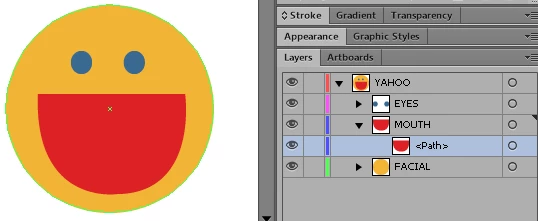
As you see, I finished a figure drawing, however I realize he will become cute if there's teeth, so I place cursor at <Path> and press "new layer":
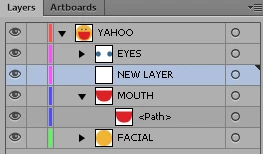
New layer placed but it's outside of mouth, I must set it's position manually follows:
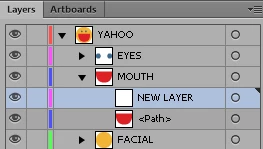
In real project, mouth can include vast array of sub layers, new layer which I insert, it can above this layers and below other layers, it consume time to drag from outside to inside (and drag to right position), hope you preserve tip/trick for this issue, sincerely thanks!

This topic has been closed for replies.
Correct answer Monika Gause

Kirimaru  schrieb

Look at a layer with plenty sub-layer, you see how difficult to insert new layer at right position because AI auto push new layer outside...

You don't understand layers.

The layer panel lists layers, sub layers, groups, paths and a whole lot of objects that are actually containers for whatever is inside.

Only layers can have sub layers. You can't put a sub layer into a group. Your original issue is most probably that MOUTH is not a layer, but a group. And you simply cannot put a sub layer into it. You can put other groups in it though.

So what you want to do (creating sub hierarchy inside containers of all kinds) is not possible using the layers panel.

2 replies

dougofakkad v2
Inspiring
November 9, 2018

Do you need to have everything in its own layer for some production reason? If not, why not just work with objects?

KirimaruAuthor
Participating Frequently
November 9, 2018

I making sprites, I want organized each body part separately, afterwards I can manipulate character posture easily.

Look at a layer with plenty sub-layer, you see how difficult to insert new layer at right position because AI auto push new layer outside...

Monika Gause
Community Expert
Monika GauseCommunity ExpertCorrect answer
Community Expert
November 9, 2018

Kirimaru  schrieb

Look at a layer with plenty sub-layer, you see how difficult to insert new layer at right position because AI auto push new layer outside...

You don't understand layers.

The layer panel lists layers, sub layers, groups, paths and a whole lot of objects that are actually containers for whatever is inside.

Only layers can have sub layers. You can't put a sub layer into a group. Your original issue is most probably that MOUTH is not a layer, but a group. And you simply cannot put a sub layer into it. You can put other groups in it though.

So what you want to do (creating sub hierarchy inside containers of all kinds) is not possible using the layers panel.

Inspiring
November 9, 2018

not sure why you are working like this but since you are...

i think what you want to do is select Mouth layer and make a new "New Sublayer" from the flyout menu instead of "New Layer". The new sublayer will however be the first item inside the layer so you'll have to movie it afterwards if there is a lot of objects in that layer.

anyway, good luck with that. i don't see how you would distinguish between groups, objects and sublayers when your layer tree grows.