
Participant
July 9, 2020
Answered

How to stack multiple images on top of each other in 3D layers?

  • July 9, 2020
  • 3 replies
  • 2738 views

I want to layer 2D images on top of each other in a "pancake stack" like effect, like this:
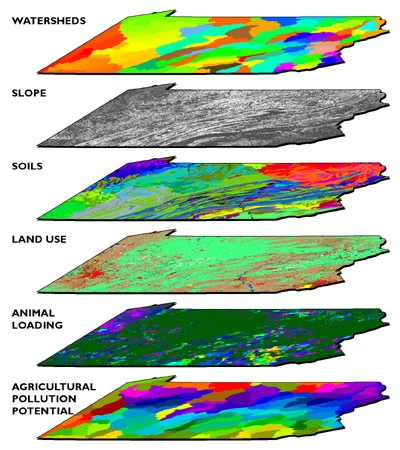


Can someone help me figure out how to do this? I'm a beginner Illustrator user so am trying to figure out the perspective tool, but I can't quite get the image to align properly. Is that the right tool to use? If so, should I be using one or two point perspective?
 

This topic has been closed for replies.
Correct answer Ton Frederiks

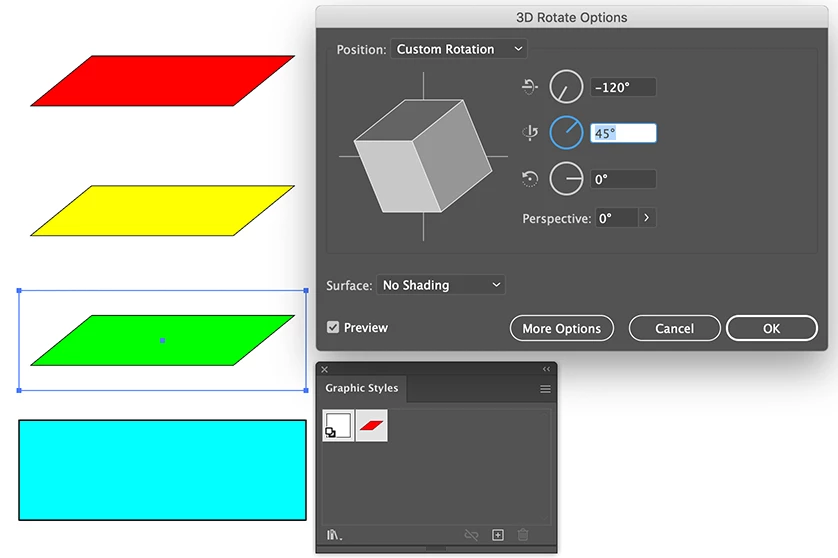
You could apply a 3D Rotate effect on one of the objects, save it as a Graphic Style and Alt click apply it on the other ones.

3 replies

michelew83603738
Community Expert
Community Expert
July 9, 2020

You could also use the perspective grid and draw your rectangles or shapes on the grid system with no problem. Any of the solutions given here will work, just test them out and use the one that works best for you. Good luck.

Ton Frederiks
Community Expert
Ton FrederiksCommunity ExpertCorrect answer
Community Expert
July 9, 2020

You could apply a 3D Rotate effect on one of the objects, save it as a Graphic Style and Alt click apply it on the other ones.

sstracAuthor
Participant
July 9, 2020

thank you so much! this worked perfectly

Ton Frederiks
Community Expert
Community Expert
July 9, 2020

Good to hear that worked for you!

Mylenium
Legend
July 9, 2020

That's a simple conventional distortion. Nothing to do with perspective drawing. You simply apply an envelope warp or free transform to your layers and arrange them accordingly.


Mylenium