Participant
November 7, 2019
Question

i can't scale patterns in illustrator

  • November 7, 2019
  • 5 replies
  • 5482 views

hi adobe community 
i am newbie with illustrator . 
i can't scale patterns in illustrator 
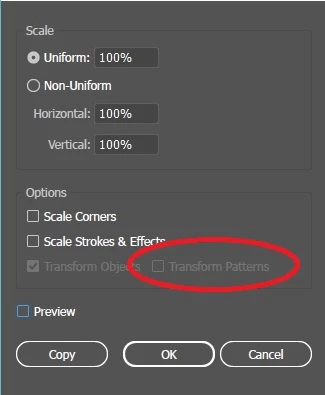
 

i downloaded those patterns from freepik.com ( i have premium account )
sorry for my english
regards

This topic has been closed for replies.

5 replies

Participant
November 9, 2019

thanks for all adobe community members .
i have succeeded to resolve the problem .
but after export the file as png 300 ppi it looks like this when i zoom the picture

Participating Frequently
December 2, 2019

Use the Window>Pattern Options (Panel)

Tweak the Width or Height numbers to remove the hairline.

tip* Save as .pdf to check your file

Creating Seamless patterns:

https://helpx.adobe.com/illustrator/using/patterns.html#create_seamless_geometric_patterns

renél80416020
Inspiring
November 7, 2019

Salut!

Je pense qu'il suffit de créer un motif (simple)

et de l'appliquer à un tracé ensuite les options doivent redevenir actives.


jane-e
Community Expert
Community Expert
November 7, 2019

Hi

If it still isn’t working, show us two screenshots;

  • Your Swatches panel with the Pattern Swatch in it.
  • Double-click the Pattern to open Pattern edit mode and take a screen shot of the dialog and the pattern editing.

~ Jane

rcraighead
Legend
November 7, 2019

meganchi is correct; your artwork is not yet a pattern.

  • Drag the artwork into the "Swatch" panel to create a pattern
  • Fill an object with the pattern fill
  • Scale the pattern using Scale dialog or using "~" key method.
meganchi
Legend
November 7, 2019

Without seeing your art, it is hard to answer. It may be that the site you downloaded the "pattern" from, is not a true pattern, but objects.


You can create one from what you downloaded by selecting the objects and dragging them to your swatches panel.

Participant
November 7, 2019

hi meganchi 
thanks for your reply
can you please check the pattern and advice me what to do 
http://www.mediafire.com/file/z21k0qm6f1v4don/340.eps/file
thanks

Participating Frequently
November 7, 2019


As rcraighead mentioned in thread:

1. Fill the object with the Pattern Fill.

2. When Scaling uncheck "Transform object"