


evand3881462
Participant
November 30, 2018
Answered

Illegal Operand: File will open but artwork is all gone

  • November 30, 2018
  • 3 replies
  • 1572 views

Hello, I am getting the below message when I open my Illustrator file. After I hit ok, the file opens but is blank. I previously had artwork I had designed in the file. Is there any way to recover this?
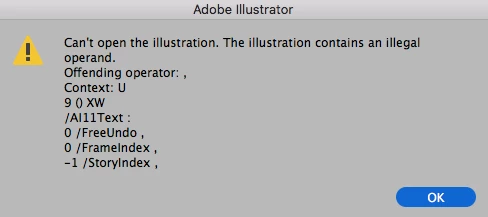

This topic has been closed for replies.
Correct answer barbara_a7746676

It looks like the file is corrupt. It may not be possible to recover it, but you could try this:

Create a new file in Illustrator. Then File > Place the corrupt file into the new file. Select the placed file and choose Object > Flatten Transparency. Choose Object > Clipping Mask > Release. If this works, the objects will probably be grouped, but of course you can ungroup them.

3 replies

Raghuveer_Singh
Inspiring
December 5, 2018

Hi,

Will it be possible for you to share the file with me so that I can have a look into this & try to extract the data from the corrupted file?

Thanks & Regards,

Raghuveer Singh

Illustrator Team

rbhunwal<AtTheRate>adobe<Dot>com

Jacob Bugge
Community Expert
Community Expert
December 5, 2018

Thank you very much for your support, Raghuveer.

Jacob Bugge
Community Expert
Community Expert
December 2, 2018

Evan,

In addition to what Barbara said, for a possibly full(er) recovery here are some websites where you can see whether it can rescue the actual file, and if it can, you may pay for a subscription to have it done,

http://www.recoverytoolbox.com/buy_illustrator.html

http://markzware.com/adobe-software/fix-illustrator-file-unknown-error-occurred-pdf2dtp-file-recovery/

http://www.illustrator.fixtoolbox.com/

http://www.erepairillustrator.com/

As far as I remember, the first one is for Win and the second one is for Mac, while the third and fourth one should be for both.

Here are a few pages about struggling with it yourself:

http://daxxter.wordpress.com/2009/04/16/how-to-recover-a-corrupted-illustrator-ai-file/

http://helpx.adobe.com/illustrator/kb/troubleshoot-damaged-illustrator-files.html

http://kb2.adobe.com/cps/500/cpsid_50032.html

http://kb2.adobe.com/cps/500/cpsid_50031.html

http://helpx.adobe.com/illustrator/kb/enable-content-recovery-mode-illustrator.html

It is always recommended to create backups with different names regularly, and to store backups in more than one place/way.

And also to save often.

If you have the Cloud, you can also set it to save copies with all the changes.

https://helpx.adobe.com/illustrator/using/crash-file-data-recovery.html

and here are some other suggestions,

https://forums.adobe.com/message/9328988#9328988

barbara_a7746676
Community Expert
barbara_a7746676Community ExpertCorrect answer
Community Expert
December 2, 2018

It looks like the file is corrupt. It may not be possible to recover it, but you could try this:

Create a new file in Illustrator. Then File > Place the corrupt file into the new file. Select the placed file and choose Object > Flatten Transparency. Choose Object > Clipping Mask > Release. If this works, the objects will probably be grouped, but of course you can ungroup them.