


Participant
January 16, 2020
Answered

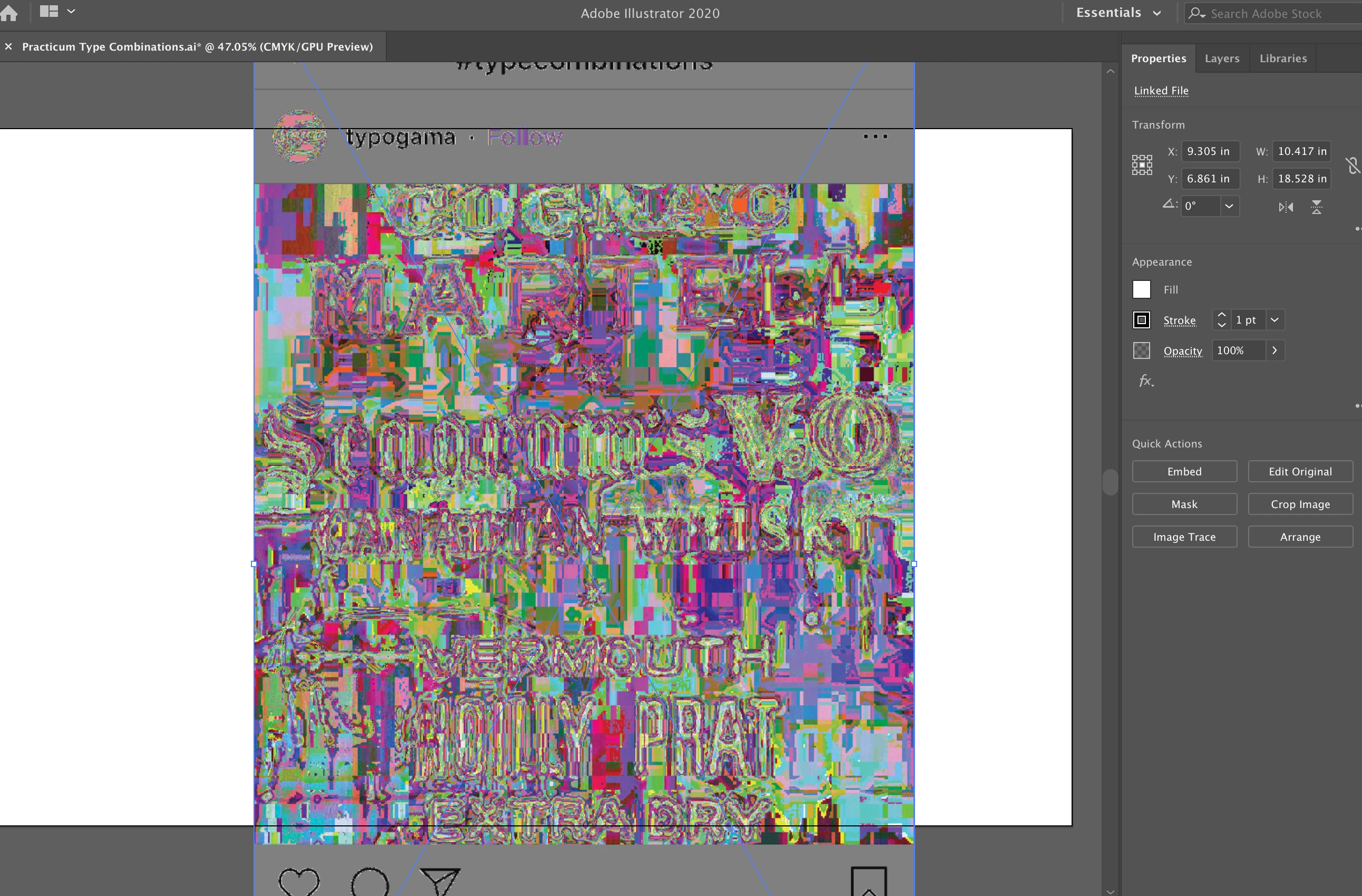
Illustrator 2020 Imported .PNGs Look Weird

  • January 16, 2020
  • 7 replies
  • 5696 views

When I import .png's, it gives me this weird distortion. I tried with a .jpg and it worked, but pngs's isn't. It happens when I drag the photo in as well as file > place. Doesn't change anything when I embed the link. I have the most recent version of Illustrator 2020. Can anyone help me figure this out?

 

This topic has been closed for replies.
Correct answer Ton Frederiks

Change them to 8 bits/channel (Image > Mode) in Photoshop and you can vote for support for iPhone png's here:

https://illustrator.uservoice.com/forums/333657-illustrator-feature-requests/suggestions/37137061-pn...

7 replies

Participant
July 27, 2020

Issue is still there. Apparently Illustrator can't handle 16bit color PNGs, which is what iPhone screenshots are and what I was trying to upload. 🤦🏼‍♀️ (And apparently you can't post a female facepalming emoji either, only male...) But if you import the image to Photoshop and change it to 8bit then save and reupload to Illustrator like Ton_Frederiks said, it works. 

Participant
May 28, 2021

You should have 8 Bits/Channel before place an image.


Still, Illustrator doesn't fix this matter.


A better way, changing a bit before place the image to 8 Bits/Channel


Got to Image > Mode > 8 Bits/Channel


Participant
July 27, 2020

Hello, Did you found a solution for this? I'm having the same issue. (Ilustrator 2020)


Ton Frederiks
Community Expert
Ton FrederiksCommunity ExpertCorrect answer
Community Expert
July 27, 2020

Change them to 8 bits/channel (Image > Mode) in Photoshop and you can vote for support for iPhone png's here:

https://illustrator.uservoice.com/forums/333657-illustrator-feature-requests/suggestions/37137061-pn...

Ton Frederiks
Community Expert
Community Expert
May 14, 2020
austboston
Participant
April 11, 2020

Same issue. Was there ever a fix for this? The colors are way off. Not quite inverted, but all different. Can't find a fix. Illustrator 2020 with MacOS 10.15.4.

Legend
April 11, 2020

Mac OSX 10.15.4, fine

Illustrator 2020 info is incomplete. Please select Illustrator menu>About Illustrator, and specify the numerical version number that appears top left in the panel shown. Thank you.


Try to place the PNGs in RGB documents. 

Larry G. Schneider
Community Expert
Community Expert
January 16, 2020

Are these RGB or are you trying to make CMYK PNG files?

Ton Frederiks
Community Expert
Community Expert
January 16, 2020

Where do these PNG's come from?

Does it happen with all PNG's?

If you open them in Photoshop (or another image editor) and resave them, is it still the same?

Ashutosh_Mishra
Inspiring
January 16, 2020

Hi Hallie,


Thanks for reaching out. I'd recommend clicking on View > Preview on CPU and see if it makes a difference.
Also let us know the version of OS please. Looking forward to your response.


Regards,

Ashutosh

Participant
February 19, 2020

I am experiencing the same issue and so are my coworkers. View/Preview on CPU did not work.

Any updates or fixes are greatly appreciated.


Mac OS 10.14.6. Adobe Illustrator 2020.