

Martin_Ritter
Legend
June 7, 2017
Answered

Illustrator CC 21.1.0 Anchor points not visible anymore

  • June 7, 2017
  • 1 reply
  • 1944 views

Hello Community,

I just encountered an issue with my newly updated Illustrator: an anchor point of a path is only visible, when I get close to them with the mouse. It used to be, that all anchor points of a path where visible, as soon as one switch to the white arrow (shortcut A). Edges are not hidden!

See the screenshot below: path is visible, but only the anchor point in the left under corner - what is the position of my mouse.
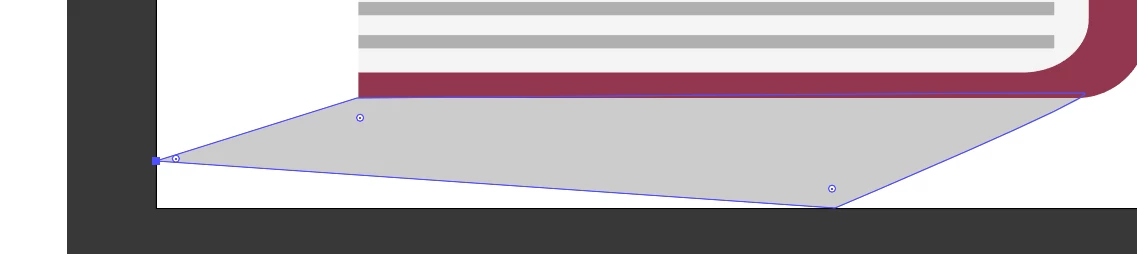
Did I miss a setting, or is this a new feature?

Thanks and sorry, if this is a noob question...

Martin

This topic has been closed for replies.
Correct answer Martin_Ritter

Okay, a good old restart did fix this.

Thanks Monika for your reply.

Cherrs, Martin

1 reply

Monika Gause
Community Expert
Community Expert
June 7, 2017

The corresponding setting is in Preferences > Select and Anchor point display. Maybe it's turned off.

Martin_Ritter
Legend
June 7, 2017

It's german, but the settings should be identical:

Martin_Ritter
Martin_RitterAuthorCorrect answer
Legend
June 7, 2017

Okay, a good old restart did fix this.

Thanks Monika for your reply.

Cherrs, Martin