

Illustrator CC Book Color vs Spot Color PANTONE+
Hi! Here's a question about a little detail regarding PANTONE+ spot colors.
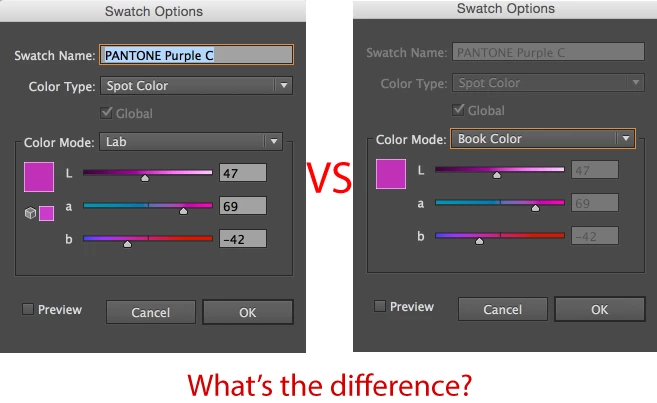
I've got a script that makes PANTONE+ colors inside a document using the available scripting methods, which produce a spot color with the desired Lab color values, but when double-clicking and bringing up the swatch dialog it does not default to the grayed-out "Book Color" option in the Color Mode dropdown.
However, it does have the Book Color option in that dropdown and if it's selected and applied, the next time this swatch is double-clicked and dialog appears, the proper Book Color mode is selected and appropriate fields are grayed out.
My question is: considering the functions of spot colors in Illustrator, ink plating and appearance and anything else, does my script-made swatch bear any effect on the document that would make it in any way different than a regular document where the Book Color is shown as default in the swatch options dialog?
In Mordy Golding's explanation of Book Color mode for Pre-CS6 versions, he states that Book Colors came with hidden information which displays PANTONE-listed Lab values which relate to the Pre-CS6 CMYK-based PANTONE swatches. Now that we have PANTONE+, and Lab is the default base for the book swatches, I wonder if there is any other property that may not be considered by some function of the application if the swatch has the correct name and Lab values while not having the Book Color mode explicitly selected.
Also, if there's an undocumented property for setting the other Color Modes which can appear in this dropdown, that would also be useful information. Our current available options for SpotColorKind are just SPOTCMYK, SPOTLAB and SPOTRGB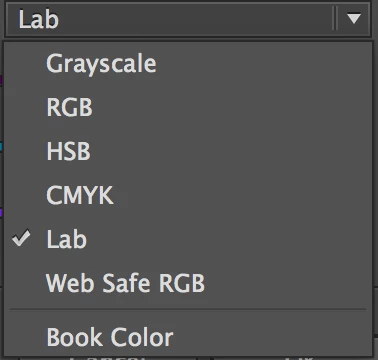
 AdChoices