
aaronh71805722
Participant
March 14, 2017
Answered

Illustrator crashes every five minuets, runs very slow [Windows 10]

  • March 14, 2017
  • 1 reply
  • 1400 views

Hi. Illustrator keeps crashing every five minuets, runs very slowly, making it impossible to use. I'm only using the paintbrush tool. I can get about four strokes in before it gives up the ghost.

It's giving me the: "Adobe Illustrator CC 2015.3 has stopped working - A problem caused the program to stop working correctly. Windows will close the program and notify you if a solution is available." with the options of "Debug" and "Close Program".

Specs:

OS: Windows 10 (64-bit)

Processor: Intel Core i7-5820 CPU @ 3.30 GHz 3.30 GHz

RAM: 16 GB

Video: GeForce GTX 1080

Let me know if you've got ideas. It's completely unusable at the moment. Let me know if you need more info.

Thanks!
This topic has been closed for replies.
Correct answer Om Nath Jha

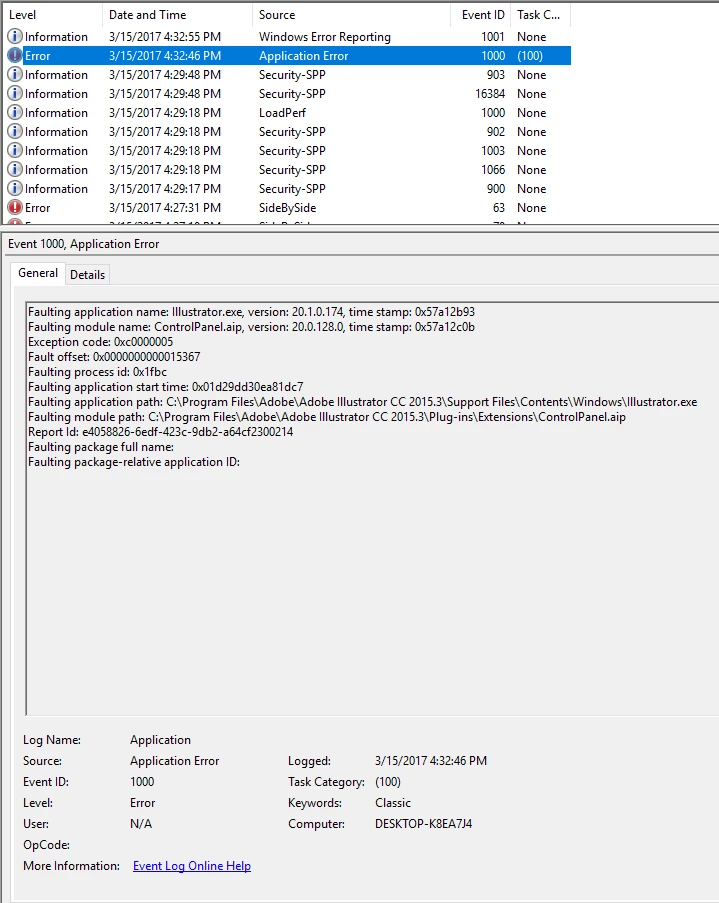
I just updated my driver. Still having the same issue. I updated to version 378.78 of my card's driver. Here's the error log if that helps.

Any other ideas?


Hi Aaron,

Thanks for the details. Did you try disabling the GPU in the preferences? If not please do and check. Are you using any addition device like Wacom? Is there a reason you are not upgrading to CC 2017 version of Illustrator?

Regards,

Om

1 reply

Om Nath Jha
Legend
March 14, 2017

Hi Aaron,

Sorry to hear that your Illustrator CC 2015.3 is crashing regularly. As you mentioned, you are using Paintbrush when it crashes, is it the only workflow that leads to the crash? What happens if you don't use that tool, does the app work fine?

Do you have any third party plugins installed? Are you working with network drive?

Thanks for sharing the system information. Please share the "Event Viewer" log as well, so that it can give more possible cause of the crash. See sample screenshot below. This one is for InDesign as I was not able to get one for Illustrator, however you need to check for Illustrator Application Error.

Regards,

Om

aaronh71805722
Participant
March 14, 2017

Hi Om. As for my workflow, here's what I did:

I dragged in a .jpg for reference (869x1160). Made a new layer. Selected the paintbrush tool. Made a new calligraphy brush with pressure sensitivity. Drew four strokes with the paintbrush tool, and then it crashed.

On a second attempt, I removed the reference image and drew some random strokes with the paintbrush tool. While using the selector tool to drag the vertices in those strokes around, it crashes.

Both times, it would get progressively choppier as I worked, and within five minuets, the app would progressively run slower and slower until it freezes and crashes. The app does not seem to get worse by using certain tools, it just gets worse no matter what you do. Just panning and zooming around seems to crash it.

I have no plugins installed, and I am not working with network drive.

Here's my event logs. I'll try to give you a description of what I was doing when I got the error.

Just before I got these two errors, I had just opened Illustrator after a long period of not using it. It asked me to re-activate my license before I could use the program, and I did without issue. I didn't notice these errors until just now when I looked.

This error is the first time the app crashed on me.

Here's the second time it crashes on me. At this point, I give up for the night. I posted some questions on Twitter, then turned off my PC.

The next evening, I check my Twitter, the Adobe Customer Care Twitter account suggests I turn off GPU performance. I check, and it was already off. However, I turn it on, and it seems to work well for about a half hour. But then it crashes in the same manner as the other crashes. Giving me the above error.

Om Nath Jha
Legend
March 15, 2017

Hi Aaron,

Looking at the Event Viewer logs, it seems the issue is related to the graphic card/driver itself. Please check if there is an update pending for the graphic card drivers. If yes, update it and then check Illustrator.

Regards,

Om