
Illustrator - shape not filling correctly
Looking for some help filling a design as I'm new to using illustrator and there is only so much searching youtube will do.
I have drawn a simple plain stroke design, black on white. I'm trying to fill in parts of it solid black to see how it looks. I'd intended to fill it in black, and make the stroke white, to reverse the colours really to retain the spirals. Some knotwork I made filled perfectly, however these parts are filling very strangely. It looks like something to do with the anchor points, with parts of white left between them. 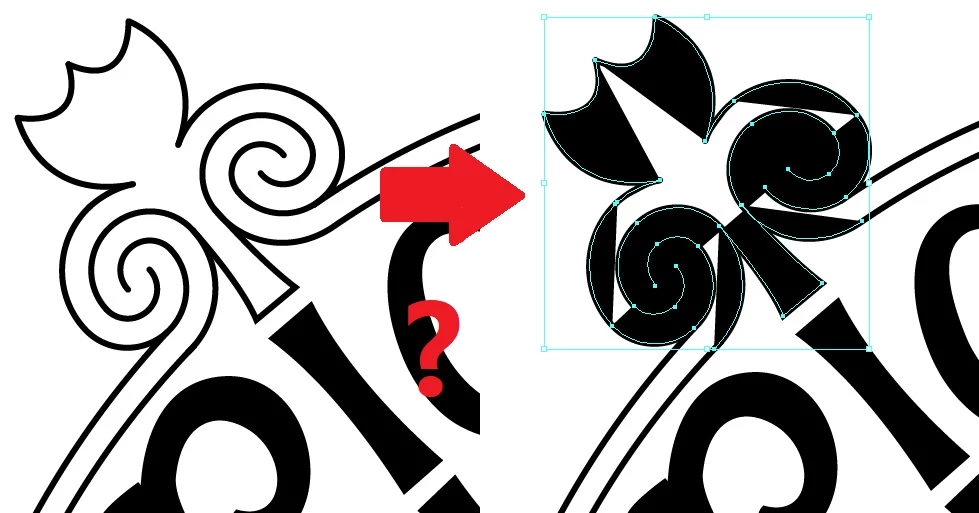
clicking random stuff to find a solution, i clicked on 'exclude' in shapes window it showed this up wich corresponds with where parts are filling and others are not. some sort of connection between those anchors for some reason it's messing it up. 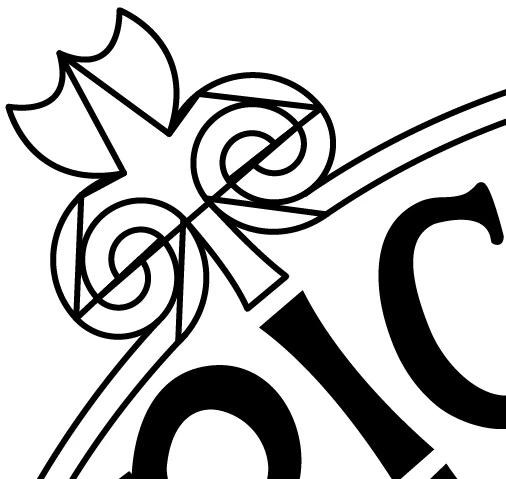
Is there a way I can remove those invisible intersecting lines, and make it all one solid shape that will fill as one piece? Any advice would be great.
 AdChoices