
Image trace in js script
Hi!
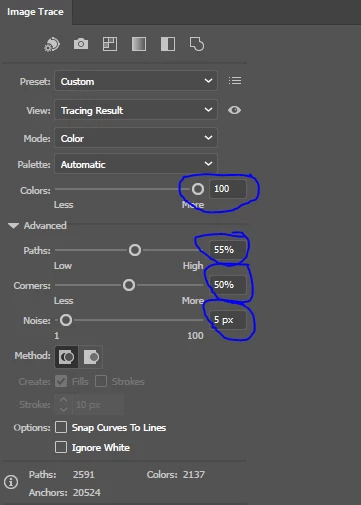
I'm trying to trace a PNG image in Adobe Illustrator via js script. I've tried different approaches, but always have the same problem - I can't change Color setting automatically. Here is my simple script:
thisImage.tracing.tracingOptions.tracingMethod = TracingMethodType.TRACINGMETHODABUTTING;
thisImage.tracing.tracingOptions.tracingMode = TracingModeType.TRACINGMODECOLOR;
thisImage.tracing.tracingOptions.cornerFidelity = 50;
thisImage.tracing.tracingOptions.pathFidelity = 55;
thisImage.tracing.tracingOptions.noiseFidelity = 5;
thisImage.tracing.tracingOptions.maxColors = 40;
thisImage.tracing.tracingOptions.colorFidelity = 50;
app.redraw();
So other parameters were changed during this script execution (Paths, Corners, Noise), but Colors is 100 again despite maxColors and colorFidelity. And I don't see any additional fields in tracing options that can be responsible for this.
Could you please give me any advise how to solve this issue?


 AdChoices