
July 2, 2020
Answered

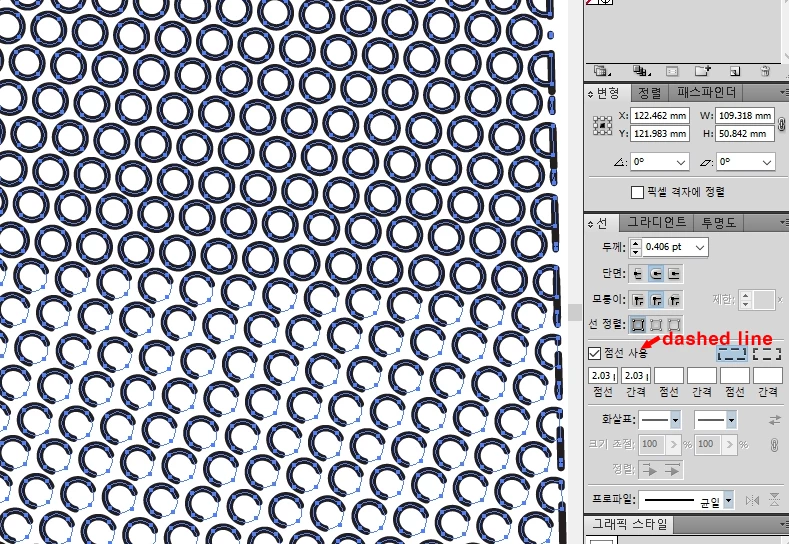
in compound path, dashed line shows full line, why?
  • July 2, 2020
  • 3 replies
  • 1097 views


in the pic. you can see two parts like [dashed circle] and [full lined circle]

Actually they are splitted two parts as each compound path group

but the only upper group of compound path shows like solid line.

it is really weired situation i don't know why, maybe CS5 has bug of this type option?

even it is already has dashed option, it shows like that.


But when i broke the compound path, it finally shows dashed circles as the lower group.

and also when i print it, shows dashed. [like next pic]
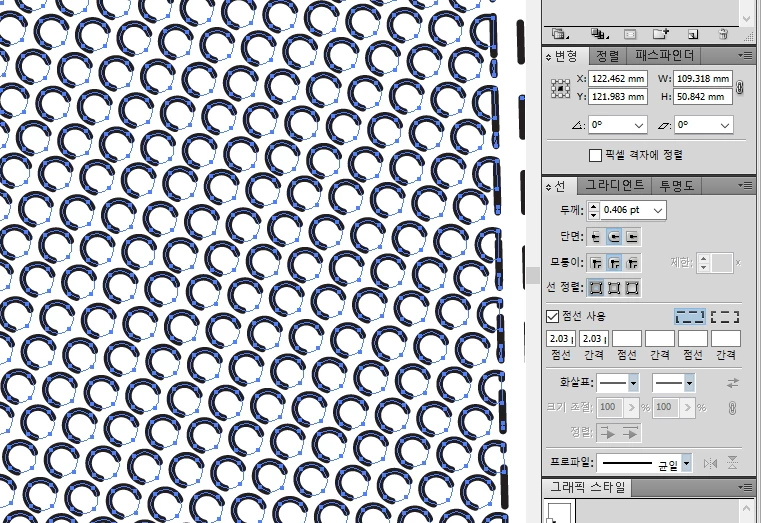
the point is,

In the illustrator the upper parts shows full lined circle even it has put dashed line option.

and also this file in the PHOTOSHOP, has same problem.

it means, photoshop doesn't know what designer induced. 


that makes me craaaaaaazy.


illustrator CS5

photoshop CS5.1

windows 10(64bit)

This topic has been closed for replies.
Correct answer Disposition_Dev

Looks like you just need to shrink the size of the dashes. in your screenshot, your stroke panel indicates your dash length is 2.03pt, and the space between dashes is 2.03pt. My guess is that the circles that are getting this dashed stroke have a circumference of approximately 3pt, which is why you see a dash on one side of it and nothing on the other.


try changing your dash/space values to 1pt and see if that fixes it for you.

3 replies

Disposition_Dev
Disposition_DevCorrect answer
Legend
July 2, 2020

Looks like you just need to shrink the size of the dashes. in your screenshot, your stroke panel indicates your dash length is 2.03pt, and the space between dashes is 2.03pt. My guess is that the circles that are getting this dashed stroke have a circumference of approximately 3pt, which is why you see a dash on one side of it and nothing on the other.


try changing your dash/space values to 1pt and see if that fixes it for you.

Monika Gause
Community Expert
Community Expert
July 2, 2020

Can you please show the appearance panel and the layers panel?

barbara_a7746676
Community Expert
Community Expert
July 2, 2020

You could create a pattern from the circle with the dashed line. That way the circles would always be consistent.